Introduction:
Data Import is a feature in Strategy Intelligence Server/Web 9.x which allows users to import data from sources such as Excel, CSV and databases into Strategy without any architecting steps. For more information about this new feature, refer to the Strategy Product Manual Advanced Reporting Guide > Chapter 2. Importing Data.
The term "DSN-less connection" is frequently used in reference to the data import feature. This document explains the concept of "DSN-less connection" for data import.
When users wish to import data from a database source, the database instances enabled for freeform SQL, Query Builder for that project are presented to the user, as shown below. .

Users can also choose to create a new database connection by clicking on the '+' button seen in the screenshot above. In this screen, users get to choose an existing DSN or create a new connection as shown below. When choosing an existing DSN, users just need to select an existing DSN, the database type and provide a user name and password to connect to the database.

A DSN-less connection is created if users select the option to create a new connection (by selecting a database type and not selecting the option for 'Existing ODBC DSN'). The DSN-less connection option conveniently allows users to directly connect to a database without having to create a physical database connection (DSN) on the Strategy Web Server or Intelligence Server machine.
On this screen, it is required to provide a name to the connection which is being created and also enter the details of the physical connection (database server, port etc.) as shown below. Also, it is possible to set the option to share this connection with other users.

Saving the newly created connection creates a special data import database instance in the metadata as shown below.

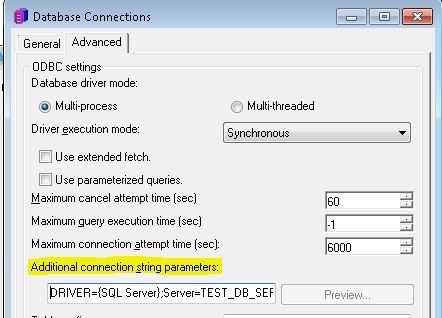
Users can edit the database and check that there is no physical DSN associated with this database instance > database connection object. The required connection parameters get saved in the 'Additional connection string parameters' under the Advanced options of the database connection editor, as shown below.