EducationSoftwareStrategy.com
StrategyCommunity

Knowledge Base

Product

Community

Knowledge Base

TopicsBrowse ArticlesDeveloper Zone

Product

Download SoftwareProduct DocumentationSecurity Hub

Education

Tutorial VideosSolution GalleryEducation courses

Community

GuidelinesGrandmastersEvents
x_social-icon_white.svglinkedin_social-icon_white.svg
Strategy logoCommunity

© Strategy Inc. All Rights Reserved.

LegalTerms of UsePrivacy Policy
  1. Home
  2. Topics

KB44638: For email subscriptions, the {[Attribute Name]@[Attribute Form]} macro does not work in Distribution Services


Community Admin

• Strategy


For email subscriptions, the {[Attribute Name]@[Attribute Form]} macro does not work in Distribution Services in MicroStrategy 9.x and 10.x

SYMPTOM:
 
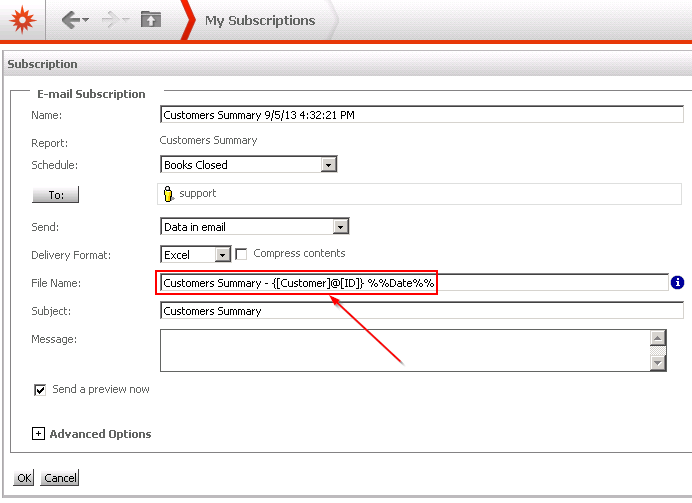
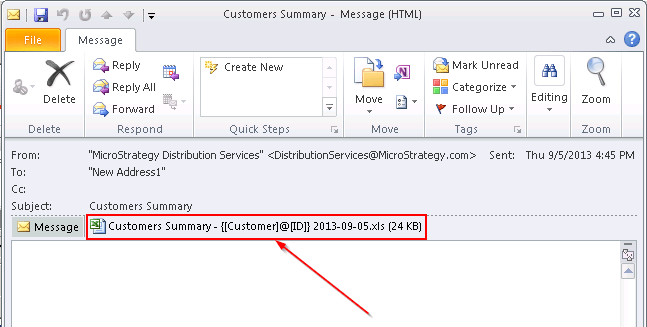
When creating email subscriptions, the {@} macro does not work and is not replaced with the attribute form.


ka04W000000Of72QAC_0EM4400000029X0.png

 
The subscription is set up as shown above and the file attached to the email has the macro in the file name as shown below.
 

ka04W000000Of72QAC_0EM4400000029Wx.png

 
CAUSE:
 
This is working as intended. The {@} macro is designed to include the bursting attribute in a file name and is only relevant when bursting file subscriptions. Other distributions, such as email, do not use this macro.
 
ACTION:
 
There is an open enhancement request to add bursting as a feature for email distributions. 
Strategy will continue to investigate and post updates as soon as they are available.
 
WORKAROUND:
 
The System Administration Guide chapter for Scheduling Jobs and Administrative Tasks lists the macros that are available for personalizing email and file subscriptions.  In most cases, it should be possible to manipulate the file name as desired using only those macros.


Comment

0 comments

Details

Knowledge Article

Published:

June 3, 2017

Last Updated:

June 3, 2017