SYMPTOM:
In Strategy Developer, users may notice that once a connection between Strategy Intelligence Server 9.x - 10.x and a SAP BW instance containing only ODS objects is established, no SAP object is available to be imported or mapped in the MDX Cube Catalog.
CAUSE:
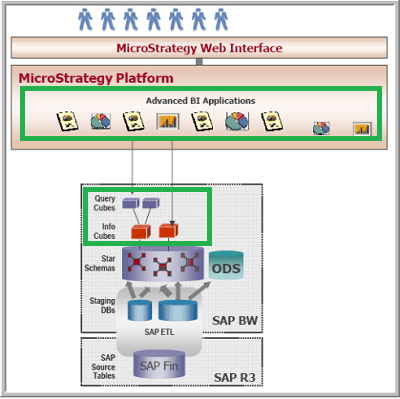
SAP ODS objects - Operational Data Store objects. These are flat relational tables and are similar to Strategy fact tables; however, these objects cannot be accessed directly from Strategy Platform. Only the InfoCubes and Query Cubes SAP BW objects can be accessed, instead. Therefore, once a connection between Strategy Intelligence Server and a SAP BW instance containing ODS objects is established, no SAP object is available to be imported or mapped through the MDX Cube Catalog in Strategy Developer.
Strategy will access the InfoCubes and Query Cubes SAP BW objects using ODBO (OLE Database for OLAP) modeling – which is similar but not identical to SAP's standard model, as shown below in the figure that illustrates how to the SAP BW objects are related to the correspondent objects on the Strategy's platform side:

In additional, the following figure illustrates how the SAP’s metadata model is translated into the Strategy’s metadata model:
ACTION:
Make sure that the SAP instance being accessed contains the InfoCubes or Query Cubes objects since these are the ones which can be accessed directly from Strategy Platform.
NOTE:
For further information on mapping the InfoCubes and Query Cubes SAP objects from Strategy Platform, refer to the Strategy MDX Reporting Guide.
