Starting in Strategy 9.3.1, additional logging is available for Distribution Services. The "DS Trigger Trace" is useful when trying to determine what triggered a subscription execution. It can be found in the Strategy Diagnostics and Performance Logging tool as shown below:
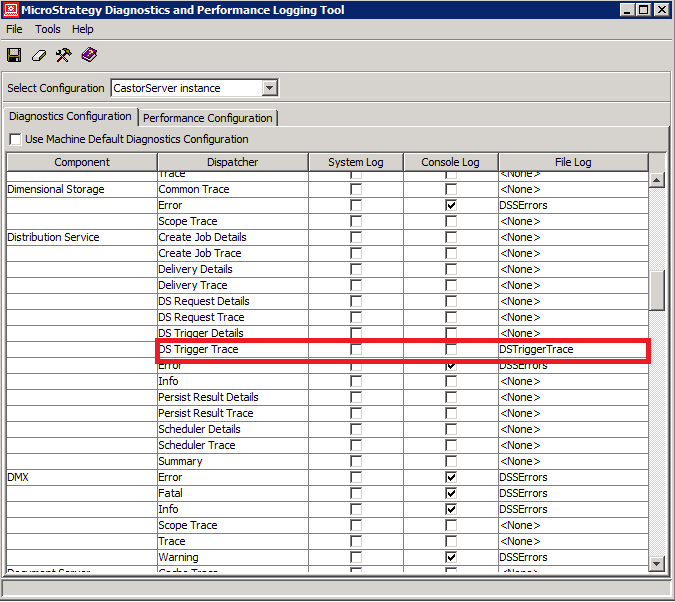
Note: This log is not enabled by default. An existing or new "File Log" destination must be selected for this logging to be used.
When a subscription runs on a schedule or the "Send Now" feature is utilized, a subsequent job will be created for Distribution Services. This trace will display details about subscriptions that were triggered and the subscription recipients. The following entries are seen in the trace when a subscription is triggered:
Sample Code/Error
2013-09-19 21:51:01.090-05:00 Enter MSIScheduler::ExecuteSubscriptionInstance(). <Subscription 'Customer Income Analysis 9/19/13 9:44:09 PM' (ID = 85768AC54A8A51D274948BBD218ACB7E), Contact '' (ID = 00000000000000000000000000000000) >
2013-09-19 21:51:01.090-05:00 Enter MSIScheduler::hCheckIfSubscriptionForNewModeContactCollection(), iTriggerID = 464E226E44C07EC58727E58E10AA74B4.<Subscription 'Customer Income Analysis 9/19/13 9:44:09 PM' (ID = 85768AC54A8A51D274948BBD218ACB7E), Contact '' (ID = 00000000000000000000000000000000) >
2013-09-19 21:51:01.355-05:00 Return 0x0 from MSIScheduler::hCheckIfSubscriptionForNewModeContactCollection() with opNewMode = false. <Subscription 'Customer Income Analysis 9/19/13 9:44:09 PM' (ID = 85768AC54A8A51D274948BBD218ACB7E), Contact '' (ID = 00000000000000000000000000000000) >
2013-09-19 21:51:01.386-05:00 Enter MSIScheduler::ExecuteSubscriptionInstanceforSingle(). <Subscription 'Customer Income Analysis 9/19/13 9:44:09 PM' (ID = 85768AC54A8A51D274948BBD218ACB7E), Contact 'Admin Contact' (ID = 0E1A5097444F861DCD1DC1A8E417B82B) >
2013-09-19 21:51:01.386-05:00 Return S_OK from MSIScheduler::ExecuteSubscriptionInstanceforSingle().<Subscription 'Customer Income Analysis 9/19/13 9:44:09 PM' (ID = 85768AC54A8A51D274948BBD218ACB7E), Contact 'Admin Contact' (ID = 0E1A5097444F861DCD1DC1A8E417B82B) >
After a subscription is triggered, this trace provides the ability to determine the following:
