EducationSoftwareStrategy.com
StrategyCommunity

Knowledge Base

Product

Community

Knowledge Base

TopicsBrowse ArticlesDeveloper Zone

Product

Download SoftwareProduct DocumentationSecurity Hub

Education

Tutorial VideosSolution GalleryEducation courses

Community

GuidelinesGrandmastersEvents
x_social-icon_white.svglinkedin_social-icon_white.svg
Strategy logoCommunity

© Strategy Inc. All Rights Reserved.

LegalTerms of UsePrivacy Policy
  1. Home
  2. Topics

KB44743: Threshold images appear enlarged or display the "insufficient data" error when exporting to Excel 2007 from MicroStrategy Web 9.3.1


Alejandro Olvera Velasco

Product Manager, Principal • MicroStrategy


In MicroStrategy Web 9.3.1, when exporting a grid with custom images as thresholds to Excel 2007, the thresholds won't display correctly in Excel.

Description

In Strategy Web 9.3.1, when exporting a grid with custom images as thresholds to Excel 2007, the thresholds won't display correctly in Excel. 
 
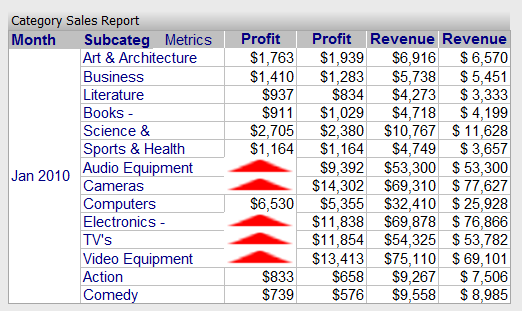
1) If the Document Properties: "Embed Images" and "Use live Excel charts" are selected, the threshold image enlarge to fit the size of the cell it's in, like shown below.
ka02R000000g2rfQAA_0EM4400000026Vd.png

 
2) If the Document Properties: "Embed Images" checked and "Use embedded bitmaps"  are selected, an error will show in place of the image, like shown below.

ka02R000000g2rfQAA_0EM4400000026VX.png


There is insufficient data to display the requested chart subtype for this report. Try using another chart subtype.
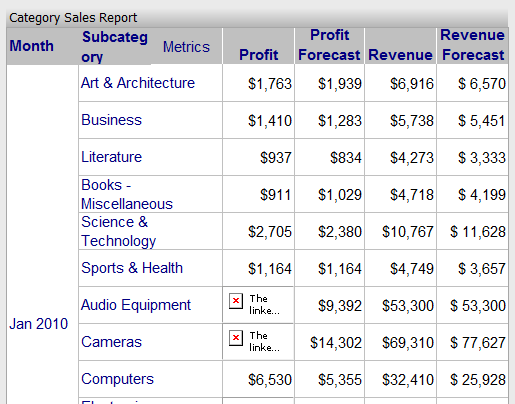
 
3) If the Document Properties: "Embed Images" unchecked, a red x and another error shows in place of the image, like shown below.

ka02R000000g2rfQAA_0EM4400000026VT.png


The linked image cannot be displayed.


Steps to Reproduce

  1. Create a document with the dataset Category Sales Report found in Strategy Tutorial.
  2. Create a threshold on the top 25% of Profit.
  3. Edit the threshold to replace the data with an image using the following relative path:
     
    
    Images\UpArrowRed.bmp

     
  4. Run the document in Strategy Web 9.3.1. The threshold should show correctly.
  5. Set the Document Properties > Export > Excel settings to check "Embed Images" and select "Use live Excel charts".
  6. Export to Excel. When opening the Excel file, notice that the images look enlarged.
  7. Edit the Document properties to select "Use embedded bitmaps".
  8. Export to Excel. When opening the Excel file, the error described above should show in place of the images.


Why is this happening?

This is a known issue involving custom image threshold in Strategy Web 9.3.1.
 

Solution

This issue has been addressed with Strategy 9.5.1. Upgrade to take advantage of the fix.
 

Option 1

  • Instead of using a relative path to define the custom image, use a URL path for the image.

Option 2

  • Use a threshold image that comes predefined in the threshold editor.

Comment

0 comments

Details

Knowledge Article

Published:

April 1, 2017

Last Updated:

September 20, 2019