EducationSoftwareStrategy.com
StrategyCommunity

Knowledge Base

Product

Community

Knowledge Base

TopicsBrowse ArticlesDeveloper Zone

Product

Download SoftwareProduct DocumentationSecurity Hub

Education

Tutorial VideosSolution GalleryEducation courses

Community

GuidelinesGrandmastersEvents
x_social-icon_white.svglinkedin_social-icon_white.svg
Strategy logoCommunity

© Strategy Inc. All Rights Reserved.

LegalTerms of UsePrivacy Policy
  1. Home
  2. Topics

KB44746: The detail header section of a document gets truncated when exporting to HTML in MicroStrategy Web 9.3.1


Community Admin

• Strategy


In MicroStrategy Web 9.3.1 when exporting a document to HTML, the detail header section gets truncated

SYMPTOM:
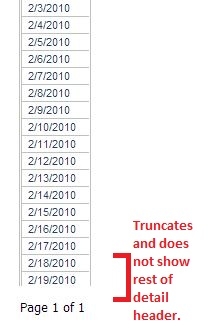
In Strategy Web 9.3.1 when exporting a document to HTML, the detail header section gets truncated as shown below.
 

ka04W000000OgYsQAK_0EM4400000026W5.jpeg

 In the image above, the Day attribute returns more rows than the ones exported, but the export is truncated.
STEPS TO REPRODUCE:
Using Strategy Tutorial Project 9.3.1, perform the following steps:

  1. Create a document and choose the "Blank Document" template.
  2. Insert a grid object into the Detail Header section.
  3. Insert the Day attribute into the grid row.
  4. Set the grid Width and Height to Fit to contents in the Layout.
  5. Uncheck "Enable incremental fetch in grid" under Advanced properties.
  6. Run in Interactive mode. Over 100 rows of data should show all the way to 12/31/2013.
  7. Now export to HTML. The rows only go to 2/19/2010 and the rest are truncated.

CAUSE:
This is working as designed in Strategy Web 9.3.1. The height of the Detail Header section cannot be specified other than by specifying the layout property "Height can grow" or by manually dragging the limit of the next section, the Detail section, down. HTML exports are unable to perform the automatic calculation to define the height of the section during exporting, thus it takes the hard coded height property and cuts the export there.
 
ACTION:
In Design Mode, push the Details section down to the exact height required to accommodate all of the data during the export.


Comment

0 comments

Details

Knowledge Article

Published:

June 14, 2017

Last Updated:

June 14, 2017