EducationSoftwareStrategy.com
StrategyCommunity

Knowledge Base

Product

Community

Knowledge Base

TopicsBrowse ArticlesDeveloper Zone

Product

Download SoftwareProduct DocumentationSecurity Hub

Education

Tutorial VideosSolution GalleryEducation courses

Community

GuidelinesGrandmastersEvents
x_social-icon_white.svglinkedin_social-icon_white.svg
Strategy logoCommunity

© Strategy Inc. All Rights Reserved.

LegalTerms of UsePrivacy Policy
  1. Home
  2. Topics

KB44751: How to sort within a threshold in Microstrategy


Community Admin

• Strategy


This article describes a method to sort a report in a manner to match threshold qualifications

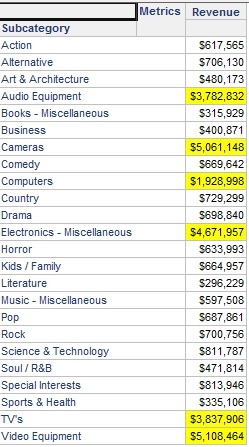
Some users would like to sort within a threshold. To better illustrate this follow the example below:
 
1. Create a report with subcategory and revenue on the template.
2. Create a threshold for Revenue to highlight values of 1,000,000 and larger.
ka04W000000OcXcQAK_0EM440000002Cf7.png

 
The user wants to sort the elements within that threshold.
 
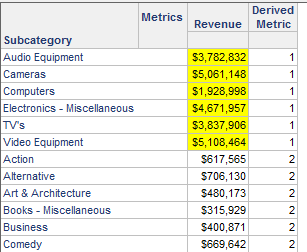
1. Create a derived metric with the following definition - Case((Revenue > 1000000), 1, 2). This will display a 1 next to values greater than 1,000,000, and a 2 to all others.
2. Insert the new metric on the grid.
3. In the advanced sorting, set the new metric and then subcategory in ascending order.
  

ka04W000000OcXcQAK_0EM440000002Cex.png

 
The attribute elements within the threshold are sorted as desired.  If the derived metric is not needed on the grid, set its column width to zero. 


Comment

0 comments

Details

Knowledge Article

Published:

May 15, 2017

Last Updated:

May 15, 2017