EducationSoftwareStrategy.com
StrategyCommunity

Knowledge Base

Product

Community

Knowledge Base

TopicsBrowse ArticlesDeveloper Zone

Product

Download SoftwareProduct DocumentationSecurity Hub

Education

Tutorial VideosSolution GalleryEducation courses

Community

GuidelinesGrandmastersEvents
x_social-icon_white.svglinkedin_social-icon_white.svg
Strategy logoCommunity

© Strategy Inc. All Rights Reserved.

LegalTerms of UsePrivacy Policy
  1. Home
  2. Topics

KB44770: Hue, Sat, and Lum values hit an unexpected limit of 240 when choosing a custom color in MicroStrategy Developer 9.x.


Stefan Zepeda

Salesforce Solutions Architect • Strategy


Hue, Sat, and Lum values hit an unexpected limit of 240 when choosing a custom color in MicroStrategy Developer 9.x.

A user may wish to choose a custom color using Hue-Sat-Lum (HSL) values from a non-Strategy application in the Strategy Developer 9.x Color window. While some applications allow HSL values anywhere in the 0-255 range, Strategy limits each value to 240. (The maximum value for Hue is actually 239.)
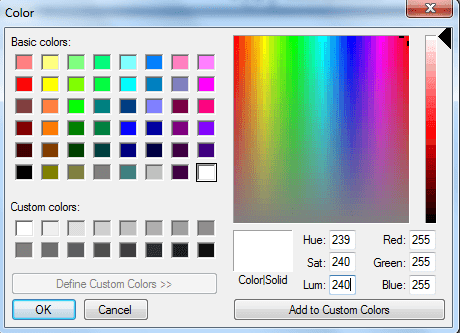
 

ka02R000000kYSvQAM_0EM440000002CfD.png

 
Therefore, if a user types in 255 for Lum, the Strategy color picker will change the value to 240 automatically. This is because Strategy Developer is a Windows application, and Windows applications use an HSL range of 0-240. While Linux and some Windows applications use an HSL range of 0-255, values 241-255 are not available in Strategy Developer 9.x.


Comment

0 comments

Details

Knowledge Article

Published:

June 8, 2017

Last Updated:

June 8, 2017