EducationSoftwareStrategy.com
StrategyCommunity

Knowledge Base

Product

Community

Knowledge Base

TopicsBrowse ArticlesDeveloper Zone

Product

Download SoftwareProduct DocumentationSecurity Hub

Education

Tutorial VideosSolution GalleryEducation courses

Community

GuidelinesGrandmastersEvents
x_social-icon_white.svglinkedin_social-icon_white.svg
Strategy logoCommunity

© Strategy Inc. All Rights Reserved.

LegalTerms of UsePrivacy Policy
  1. Home
  2. Topics

KB44773: "Please enter a valid value for 'Physical Address'" error is received when adding an email address with an apostrophe to the recipient list in MicroStrategy Web


Community Admin

• Strategy


When adding an Email addresses with an apostrophe and trying to add it to the recipients list, the following error occurs in MicroStrategy Web 9.x.

SYMPTOM:
When adding an Email addresses with an apostrophe and trying to add it to the recipients list, the following error occurs in Strategy Web 9.x.
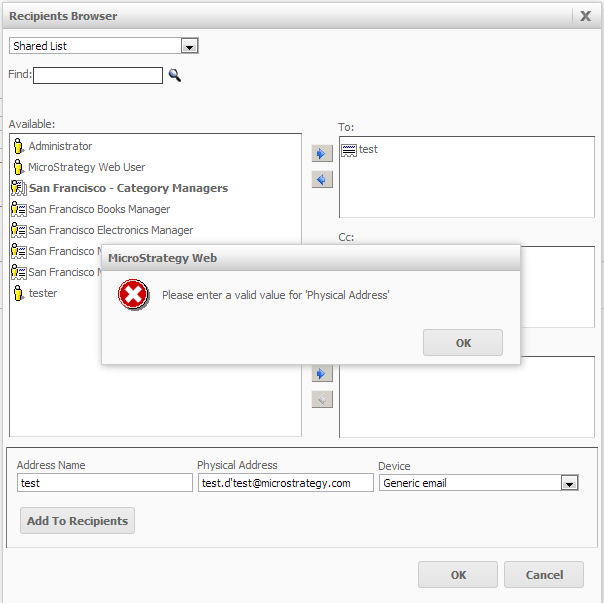
 

ka04W000000OgHnQAK_0EM4400000026W4.png


Please enter a valid value for 'Physical Address'.

 
STEPS TO REPRODUCE:

  1. Create a report.
  2. Use the "send now" option to send the report to email.
  3. Enter a recipient such as "test.d'test@Strategy.com", to the Physical Address box.
  4. Click 'Add to Recipients'.
  5. The error message appears.
     

CAUSE:
This is a known issue in Strategy Web 9.x.
ACTION:
Contact Strategy Technical Support for an update on the status of this issue.
WORKAROUND:
The email address can be entered from Strategy Desktop 9.x.


Comment

0 comments

Details

Knowledge Article

Published:

June 15, 2017

Last Updated:

June 15, 2017