EducationSoftwareStrategy.com
StrategyCommunity

Knowledge Base

Product

Community

Knowledge Base

TopicsBrowse ArticlesDeveloper Zone

Product

Download SoftwareProduct DocumentationSecurity Hub

Education

Tutorial VideosSolution GalleryEducation courses

Community

GuidelinesGrandmastersEvents
x_social-icon_white.svglinkedin_social-icon_white.svg
Strategy logoCommunity

© Strategy Inc. All Rights Reserved.

LegalTerms of UsePrivacy Policy
  1. Home
  2. Topics

KB44785: How to refresh an Intelligent Cube on a schedule using a subscription


Community Admin

• Strategy


The following knowledge base article provides instructions for creating a subscription through MicroStrategy Developer which can refresh an Intelligent Cube on a time or event based schedule.

The following knowledge base article provides instructions for creating a subscription through Strategy Developer which can refresh an Intelligent Cube on a time or event based schedule.

  • In Strategy Developer, locate the Intelligent Cube that needs to be refreshed.

ka04W000000uG8sQAE_0EM4400000029Wh.png
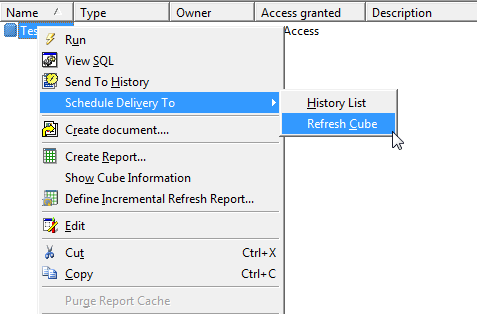
  • Right-click the Intelligent Cube, select "Schedule Delivery To" and choose "Refresh Cube".

ka04W000000uG8sQAE_0EM4400000029Wk.png
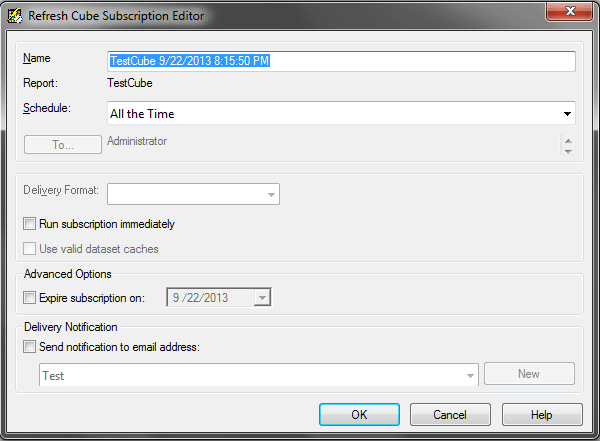
  • The "Refresh Cube Subscription Editor" allows for a "Name", "Schedule", and "Delivery Notification" to be set.
ka04W000000uG8sQAE_0EM4400000029Wi.png
  • When the subscription has been configured, click "OK" to create the refresh cube subscription.
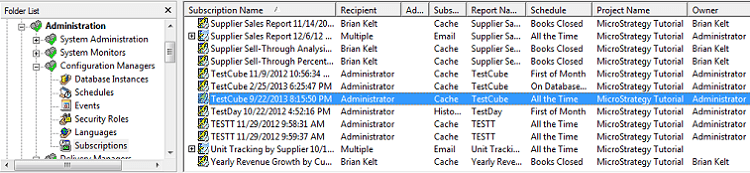
  • The subscription should now appear in the Subscription Manager, located in Strategy Developer under Administration > Configuration Managers > Subscriptions.
     
ka04W000000uG8sQAE_0EM4400000029Wf.png

For more information creating a time based schedule, refer to the following Strategy bnowledge base technical note:
 
KB19593: How to create a time based schedule in the MicroStrategy Intelligence Server 8.x
 
Note: This type of subscription can currently only be created through Strategy Developer.


Comment

0 comments

Details

Knowledge Article

Published:

May 10, 2017

Last Updated:

May 10, 2017