SYMPTOM:
The user has created a compound metric and set the metric to be a smart metric. The user sets the dynamic aggregation function of this metric to be Sum. The user adds this smart metric to a grid on a document and creates a derived element on the grid. In the derived element calculation, the metric does not calculate as a smart metric.
STEPS TO REPRODUCE:
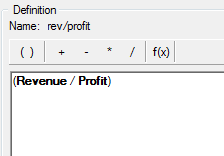
1. Create a metric called "rev/profit" metric that is defined as Revenue/Profit.
2. In the Subtotals/Aggregation tab, Set the metric to be a smart metric and set the dynamic aggregation function to be Sum

3. Create a report with the month attribute and the profit, revenue, and rev/profit metrics.
4. Add this report as a dataset to a document
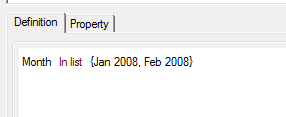
5. On the grid add a new filter derived element defined as month in list Jan 2008, Feb 2008
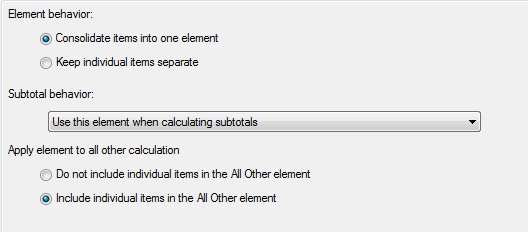
6. On the property tab of the derived element editor, change the apply element to all other calculation to include individual items in the all other calculation.
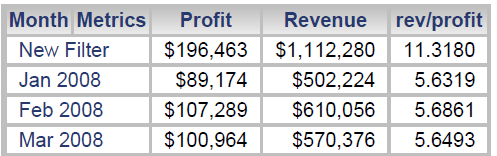
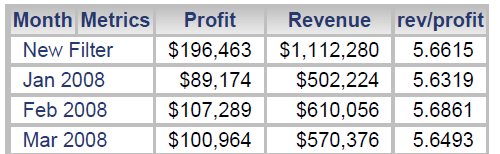
7. When the document is executed, it can be seen that the rev/profit metric is not calculating as a smart metric.
CAUSE:
This is working as designed. When default evaluation order is applied, the smart metric calculates before the derived element. Derived elements follow the same logic as dynamic aggregation. Since the dynamic aggregation function for the metric is set to sum, the derived element will sum up the individual metric values to calculate the derived element value.
ACTION:
To get the rev/profit metric to calculate as a smart metric follow the steps below:
1. Edit the grid in design mode
2. Select the Grid Menu > Grid Data Options
3. In the Grid Data Options Menu, Select Calculations > Evaluation order
4. Uncheck use default evaluation order and set the Derived element to calculate before the smart metric
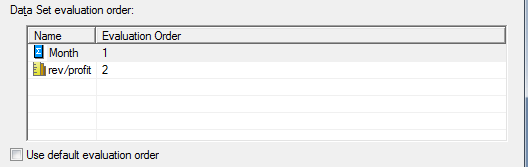
5. Execute the document. The rev/profit metric will calculate as a smart metric in the dervied element
ADDITIONAL TROUBLESHOOTING:
If the above action does not resolve the issue, consider contacting Strategy Technical Support with the following information:
