SUMMARY:
This issue has been classified as a defect by Strategy. The impact is limited to Strategy Architect 9.3.1 products on Windows machine with Strategy Developer. No Current workarounds are available in the current document. A solution/code fix for this issue is not available in current releases. Currently this issue is still being reviewed for feasibility by our Technology team and it is not scoped for any upcoming scheduled Strategy release.
SYMPTOM:
In Strategy Architect 9.3.1, the Hierarchy View does not show a relationship line between the attributes even though the relationship has been defined in the attribute editor as shown below.
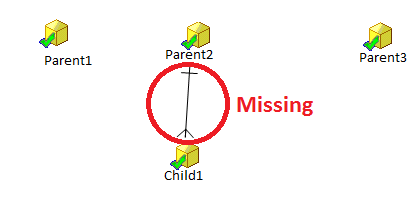
Though it has been defined in the Attribute Editor, as shown below.
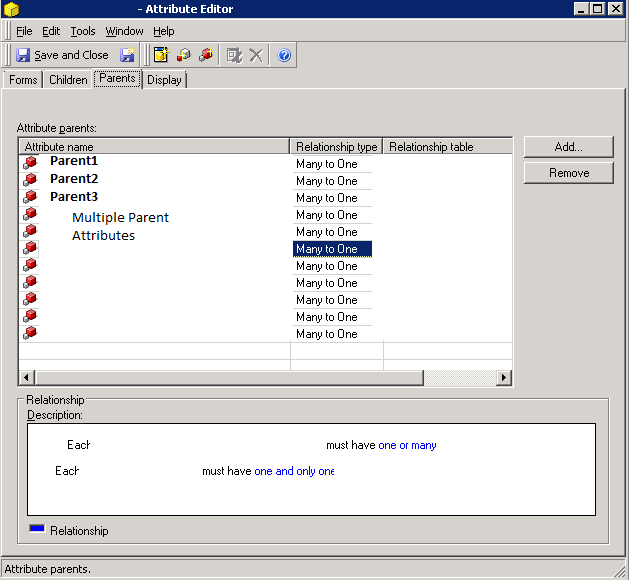
CAUSE:
This a known issue with Strategy Architect 9.3.1. which has been classified as a defect.
ACTION:
This issue has been addressed in Strategy Architect 9.4.1 Hotfix 2. Upgrade to that version to take advantage of this fix.
WORKAROUND:
No Current workarounds are available in the current document. A solution/code fix for this issue is not available in current releases
ADDITIONAL TROUBLESHOOTING:
If it is uncertain that the issue described above is what is being experienced, provide Strategy Technical Support with the following information to confirm the issue or do additional troubleshooting.
Strategy Technical Support has seen similar issues resolved while running ScanMD on the affected project in the Metadata. The TN below gives more information on how to use ScanMD.
KB35809 - Using ScanMD to fix known logical metadata inconsistencies in the Strategy 9.x Product Suite.
Note: "It is not the intention that ScanMD be used as a proactive method for addressing metadata inconsistencies. If you find yourself proactively running ScanMD and/or finding inconsistencies through ScanMD then please contact Strategy Technical Support as this means that there is, most likely, a deeper problem to be investigated."
TO LEARN MORE:
Related technotes:
KB32322 - Architect Hierarchy View does not show relationship line in Strategy 9.0.0
KB43966 - Attribute relationships do not display in Strategy Architect 9.3.0, even though it has been defined in the attribute editor.
