Under some circumstances, users might see an “out of compliance” error message after duplicating a project to another project source as shown below:
Sample Code/Error
User Licenses:
'Web Professional' is licensed for 81 named users. You are currently using 162 named users.
'Web Analyst' is licensed for 201 named users. You are currently using 162 named users.
'Web Reporter' is licensed for 201 named users. You are currently using 162 named users.
Architect' is licensed for 1 named users. You are currently using 0 named users.
….
Use the License Manager tool to view the license types required for each user. Contact your Strategy representative to obtain additional licenses
'Intelligence Server' is licensed for 201 named users. You are currently using 164 named users.
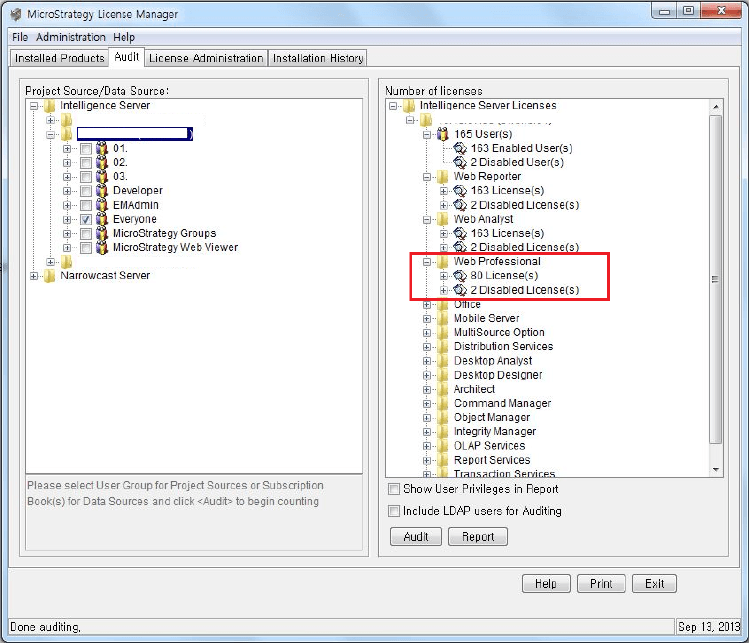
In this case, there is no error message in Strategy License Manager as shown in the image below:
CAUSE:
One possible cause of this issue is some user information is not purged from the Server Object Cache after duplicating a project into another project source.
ACTION:
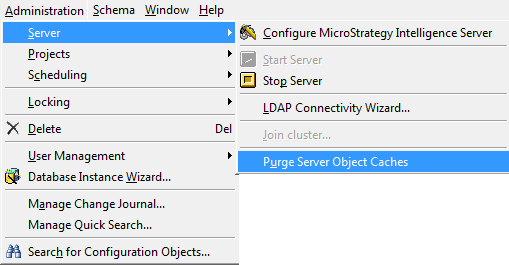
Perform a “Purge Server Object Cache” from Administration in Strategy Desktop as shown in the image below: