EducationSoftwareStrategy.com
StrategyCommunity

Knowledge Base

Product

Community

Knowledge Base

TopicsBrowse ArticlesDeveloper Zone

Product

Download SoftwareProduct DocumentationSecurity Hub

Education

Tutorial VideosSolution GalleryEducation courses

Community

GuidelinesGrandmastersEvents
x_social-icon_white.svglinkedin_social-icon_white.svg
Strategy logoCommunity

© Strategy Inc. All Rights Reserved.

LegalTerms of UsePrivacy Policy
  1. Home
  2. Topics

KB44826: When attempting to add a link to a document the error message "The Results of this document are no longer available. Please submit the request again" occurs in MicroStrategy Web


Community Admin

• Strategy


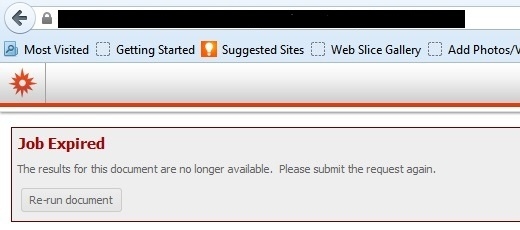
When attempting to add a link to a document to an existing document, the error message: "The Results of this document are no longer available. Please submit the request again" occurs in MicroStrategy Web.

SYMPTOM: 
When attempting to add a link to a document to an existing document, the error message: "The Results of this document are no longer available. Please submit the request again" occurs in Strategy Web.
 

ka04W000000OeCfQAK_0EM4400000026T4.jpeg


Job Expired
The results for this document are no longer availabe
  
CAUSE: 
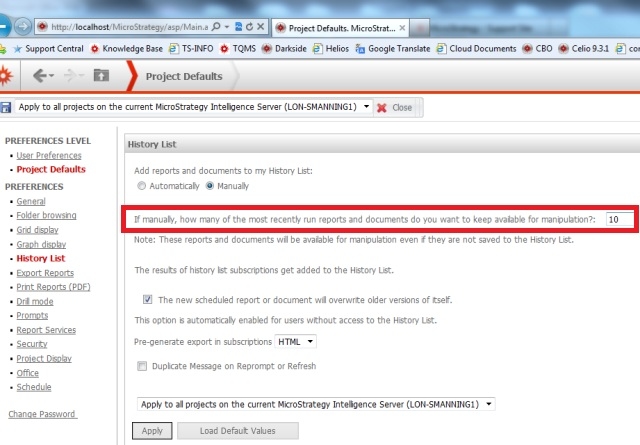
The number of recently executed reports/documented available for manipulation is too low.
 
ACTION: 
1. Open Web Preferences.
2. Select Project Defaults
3. Under History List, find the setting named:
"If manually, how many of the most recently run reports and documents do you want to keep available for manipulation?"
4. Increase this setting.
 

ka04W000000OeCfQAK_0EM4400000026T8.jpeg


Comment

0 comments

Details

Knowledge Article

Published:

June 13, 2017

Last Updated:

June 13, 2017