EducationSoftwareStrategy.com
StrategyCommunity

Knowledge Base

Product

Community

Knowledge Base

TopicsBrowse ArticlesDeveloper Zone

Product

Download SoftwareProduct DocumentationSecurity Hub

Education

Tutorial VideosSolution GalleryEducation courses

Community

GuidelinesGrandmastersEvents
x_social-icon_white.svglinkedin_social-icon_white.svg
Strategy logoCommunity

© Strategy Inc. All Rights Reserved.

LegalTerms of UsePrivacy Policy
  1. Home
  2. Topics

KB44828: Grid lines are not displayed correctly when sending reports via email to a Gmail account in MicroStrategy Web


Community Admin

• Strategy


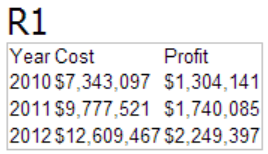
This technote demonstrates an issue when sending e-mails via Distribution Service to GMail accounts.

SYMPTOM:
When sending reports via email to a Gmail account, the gridlines do not display correctly in Strategy Web 9.x:
ka04W00000148v2QAA_0EM4400000029VG.png

 
WORKAROUND:
In Strategy Desktop, under the Administration tab, select:
Devices->[Device Name]->MIME Options->'Use inline style CSS'
This setting has to be checked for Reporting Services documents sent in email body (HTML) via Distribution Services to be displayed correctly in Gmail.


Comment

0 comments

Details

Knowledge Article

Published:

June 9, 2017

Last Updated:

June 9, 2017