EducationSoftwareStrategy.com
StrategyCommunity

Knowledge Base

Product

Community

Knowledge Base

TopicsBrowse ArticlesDeveloper Zone

Product

Download SoftwareProduct DocumentationSecurity Hub

Education

Tutorial VideosSolution GalleryEducation courses

Community

GuidelinesGrandmastersEvents
x_social-icon_white.svglinkedin_social-icon_white.svg
Strategy logoCommunity

© Strategy Inc. All Rights Reserved.

LegalTerms of UsePrivacy Policy
  1. Home
  2. Topics

KB44839: "Follow the instructions marked below by a red flag" error shows but there is no red flag when running a Report Service Document based on an MDX Cube report in MicroStrategy Web 9.x


Community Admin

• Strategy


"Follow the instructions marked below by a red flag" error shows but there is no red flag when running a Report Service Document based on an MDX Cube report in MicroStrategy Web 9.x

 
SYMPTOM:
 
"Follow the instructions marked below by a red flag" error shows but there is no red flag when running a Report Service Document based on an MDX Cube report in Strategy Web 9.x:
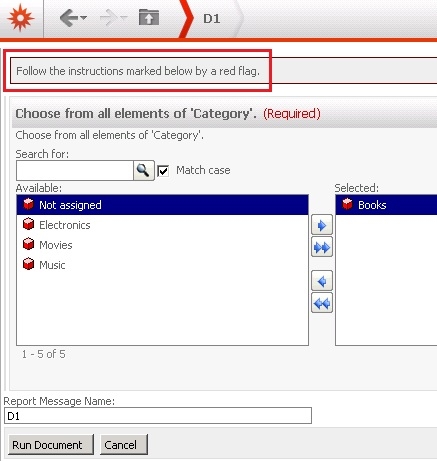
ka04W000000Of56QAC_0EM440000002Cdf.jpeg


Follow the instructions marked below by a red flag.
 
 
STEPS TO REPRODUCE:
 
Follow the steps below to reproduce the issue:

    • In Strategy Developer, create a Database Instance to connect to the MDX server.
    • Go to Menu -> Schema -> MDX Cube Catalog, and import a cube from the MDX source.
    • Select the imported cube, and go to Cube Mapping tab.
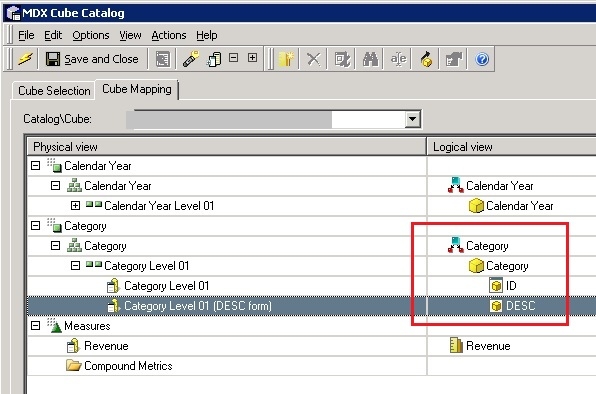
    • Right mouse click on the attribute -> Map
    • Select an existing attribute in the project, and map the attribute forms, as shown below:
ka04W000000Of56QAC_0EM440000002Ce5.jpeg
    • Save and close the MDX Cube Catalog.
    • Update Schema.
    • Create an MDX cube report, and select the imported cube.
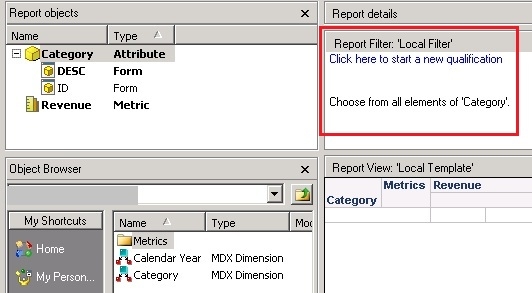
    • Add a prompt based on the mapped attribute, as shown below:
ka04W000000Of56QAC_0EM440000002Ce2.jpeg
    • Save and close the report.
    • Create a Report Service Document, and select the report as dataset.
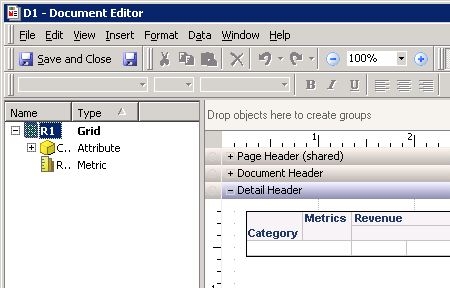
    • Add the report to document section, as shown below:
ka04W000000Of56QAC_0EM440000002Ce4.jpeg
    • Save and close the document.
    • Run the document in Strategy Web. Select any element, and the issue happens after clicking on Run Document.

 
NOTE:
The issue does not happen when the document is running in Strategy Developer.
 
 
CAUSE:
 
This is a known issue with Strategy Web 9.x.
 
 
ACTION:
 
Contact Strategy Technical Support for an update of the issue.


Comment

0 comments

Details

Knowledge Article

Published:

June 8, 2017

Last Updated:

June 8, 2017