EducationSoftwareStrategy.com
StrategyCommunity

Knowledge Base

Product

Community

Knowledge Base

TopicsBrowse ArticlesDeveloper Zone

Product

Download SoftwareProduct DocumentationSecurity Hub

Education

Tutorial VideosSolution GalleryEducation courses

Community

GuidelinesGrandmastersEvents
x_social-icon_white.svglinkedin_social-icon_white.svg
Strategy logoCommunity

© Strategy Inc. All Rights Reserved.

LegalTerms of UsePrivacy Policy
  1. Home
  2. Topics

KB44880: The error message "XMLA Discover failed" appears when running a heterogenous data access report in MicroStrategy Developer 9.4.x-10.x


Stefan Zepeda

Salesforce Solutions Architect • Strategy


When running a heterogenous data access report with filter value like "Location is exactly North America" it fails with an error

SYMPTOM:
When running a heterogenous data access report with filter value like "Location is exactly North America", it fails with the following error:
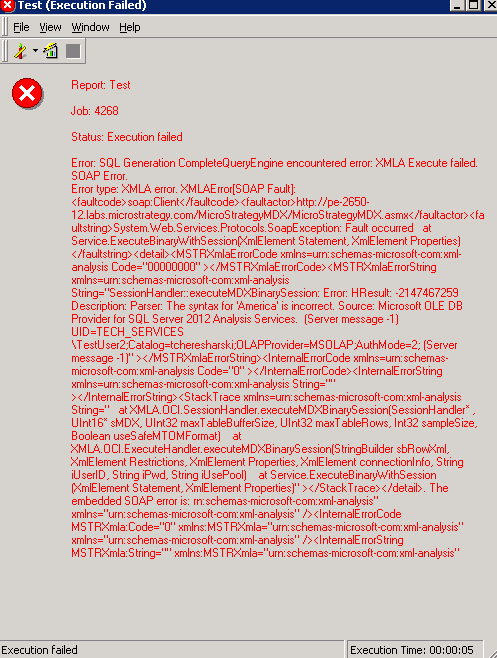
ka02R000000kcS7QAI_0EM440000002Ccx.png

Sample Code/Error
Error: SQL Generation CompleteQueryEngine encountered error: XMLA Discover failed. SOAP Server Error.
Error type: XMLA error...
 
However when running the report with filter a value like "Location is exactly APAC", it finishes successfully.
Moreover, the MDX attribute "Location" used in the report filter is not in the report template and the MDX attributes in the report are mapped to project attributes.
 
CAUSE:
This is a known issue in Strategy Developer 9.4.x-10.x.
 
ACTION:
Strategy will continue to investigate and post updates as soon as they are available.
 
WORKAROUND: 

  • Use the element list prompt for the attribute (Location) in the report filter, instead of Exactly operator
  • Put the MDX attribute(Location) used in the filter into the Report Template 

Comment

0 comments

Details

Knowledge Article

Published:

April 19, 2017

Last Updated:

April 19, 2017