EducationSoftwareStrategy.com
StrategyCommunity

Knowledge Base

Product

Community

Knowledge Base

TopicsBrowse ArticlesDeveloper Zone

Product

Download SoftwareProduct DocumentationSecurity Hub

Education

Tutorial VideosSolution GalleryEducation courses

Community

GuidelinesGrandmastersEvents
x_social-icon_white.svglinkedin_social-icon_white.svg
Strategy logoCommunity

© Strategy Inc. All Rights Reserved.

LegalTerms of UsePrivacy Policy
  1. Home
  2. Topics

KB44890: Custom subtotal with a metric in formula shows null in an OLAP report in MicroStrategy 9.x-10.x


Community Admin

• Strategy


SYMPTOM:
 
Custom subtotal with a metric in formula shows null in an OLAP report in Strategy 9.x-10.x.
 
The following steps demonstrate how to reproduce the issue in Strategy Tutorial project:
 
 
M1=Sum(M1_Fact)
 
M2=Min(M1_Fact)
 
M3_NonSmart=M1*M2
 

  1. There are two attributes C1, C2 and three metrics as shown below:


M3_NonSmart is a compound metric with "Allow Smart Metric" unchecked.
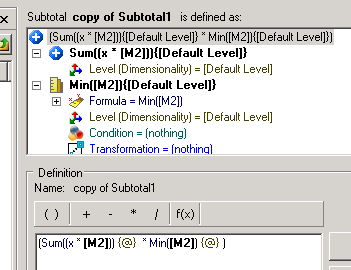


  • Create a custom subtotal function as shown below:
ka04W000000OhKJQA0_0EM440000002Cdj.png

 
Subtotal1=(Sum((x * )) {@} * Min() {@} )
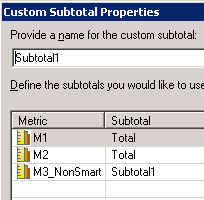


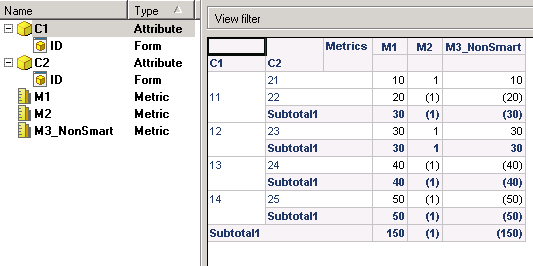
  • Create a report with C1, C2 in rows and M1, M2 and M3 in columns. Add new subtotal "Subtotal1" into the grid as shown below:
ka04W000000OhKJQA0_0EM440000002Cdr.png


ka04W000000OhKJQA0_0EM440000002Cdp.png


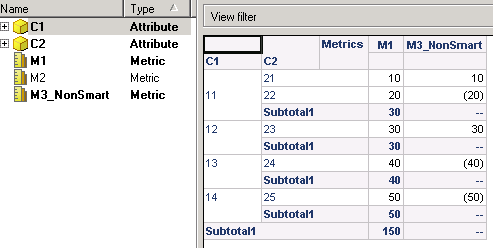
  • Subtotal1 works fine in a standard report. But it shows null for the compound metric if removing M2 from grid as shown below:
ka04W000000OhKJQA0_0EM440000002Cdv.png

 
CAUSE:
 
One possible cause for this issue is that Analytical Engine cannot find data of M2 to finish the calculation of Subtotal1 since M2 is in the formula of Subtotal1.
 
 
WORKAROUND:
 
There are two possible workarounds as shown below:
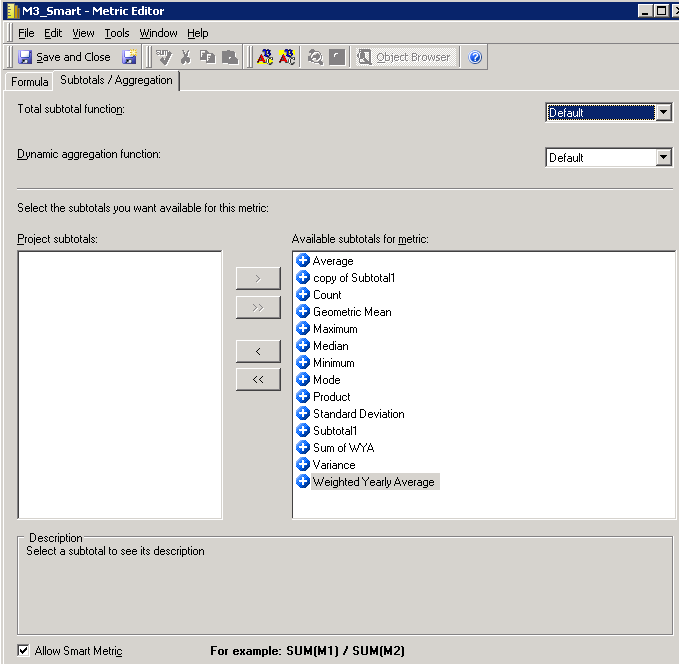


  1. Enable "Allow Smart Metric" for M3_NonSmart and change the evaluation order to get the desired data. But, this is not available for end users who need to create new report in Strategy Web since evaluation order can only be set in Desktop.
  2. Set "Total subtotal function" as default and enable "Allow Smart Metric". For example, create a new metric M3_Smart=M1*M2 as shown below: 
ka04W000000OhKJQA0_0EM440000002Cde.png

 
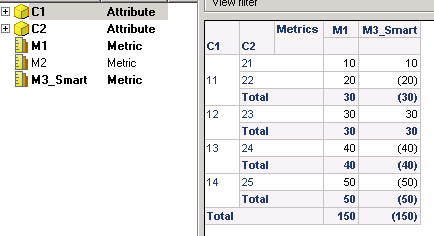
This can force M3_Smart to use the component’s total function when calculate Total. With this method, Engine will first calculate total values for Sum(M1) and Min(M2), then Total of M3_Smart = Sum(M1) *Min(M2), which should get the same result as the original custom subtotal function as shown below:
 

ka04W000000OhKJQA0_0EM440000002Cdh.png


Comment

0 comments

Details

Knowledge Article

Published:

May 25, 2017

Last Updated:

May 25, 2017