EducationSoftwareStrategy.com
StrategyCommunity

Knowledge Base

Product

Community

Knowledge Base

TopicsBrowse ArticlesDeveloper Zone

Product

Download SoftwareProduct DocumentationSecurity Hub

Education

Tutorial VideosSolution GalleryEducation courses

Community

GuidelinesGrandmastersEvents
x_social-icon_white.svglinkedin_social-icon_white.svg
Strategy logoCommunity

© Strategy Inc. All Rights Reserved.

LegalTerms of UsePrivacy Policy
  1. Home
  2. Topics

KB44903: "The SmartScreen Filter online services is temporarily unavailable" error message appears when exporting reports/documents to Excel from MicroStrategy Web 9.x or 10.x


Community Admin

• Strategy


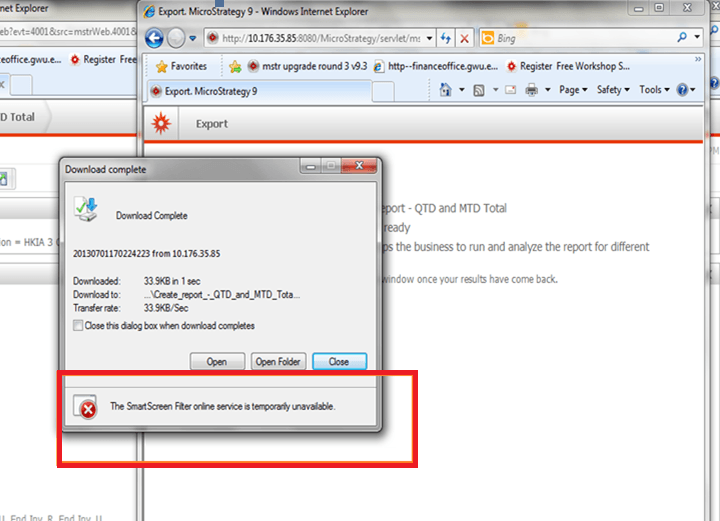
When exporting reports or documents to Excel from MicroStrategy Web 9.x or 10.x, a message "The SmartScreen Filter online services is temporarily unavailable" appears on the bottom of the "Download complete" window.

SYMPTOM:
When exporting reports or documents to Excel from Strategy Web 9.x or 10.x, a message "The SmartScreen Filter online services is temporarily unavailable" appears on the bottom of the "Download complete" window, as shown below.
ka04W000000OhmIQAS_0EM440000002HKb.png


The SmartScreen Filter online services is temporarily unavailable
 
CAUSE:
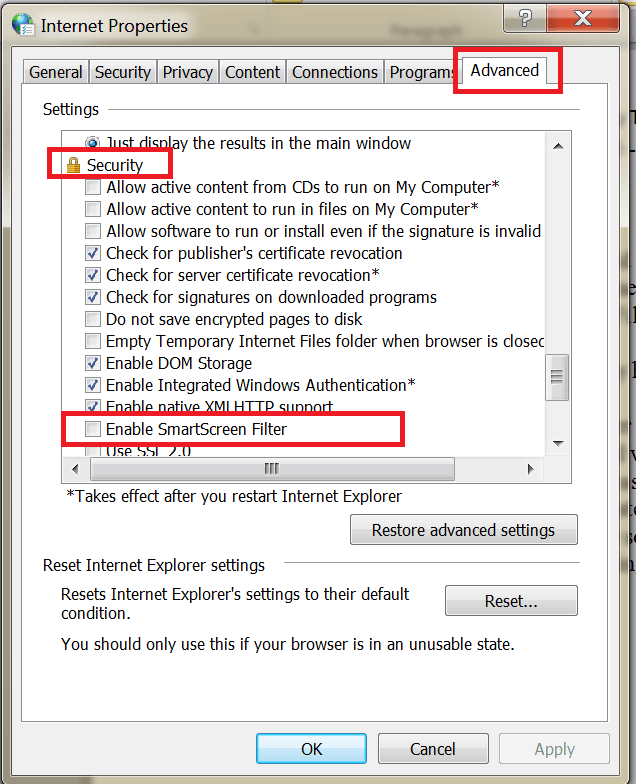
This is a warning message on Internet Explorer side, indicating that SmartScreen filter, which is a feature of IE browser, is off. 
 
ACTION:
Go to Control Panel -> Network and Internet -> Internet Options -> Advanced. Check "Enable SmarScreen Filter" under security settings, as shown below.


ka04W000000OhmIQAS_0EM440000002HKa.png

 
Third Party Software Installation WARNING
The third-party product(s) discussed in this technical note is manufactured by vendors independent of Strategy. Strategy makes no warranty, express, implied or otherwise, regarding this product, including its performance or reliability.


Comment

0 comments

Details

Knowledge Article

Published:

April 14, 2017

Last Updated:

April 14, 2017