EducationSoftwareStrategy.com
StrategyCommunity

Knowledge Base

Product

Community

Knowledge Base

TopicsBrowse ArticlesDeveloper Zone

Product

Download SoftwareProduct DocumentationSecurity Hub

Education

Tutorial VideosSolution GalleryEducation courses

Community

GuidelinesGrandmastersEvents
x_social-icon_white.svglinkedin_social-icon_white.svg
Strategy logoCommunity

© Strategy Inc. All Rights Reserved.

LegalTerms of UsePrivacy Policy
  1. Home
  2. Topics

KB44907: Chinese characters do not display well when using Cloudera driver against Hadoop Hive Database in MicroStrategy Developer 9.4.1


Stefan Zepeda

Salesforce Solutions Architect • Strategy


Chinese characters do not display well when using Cloudera driver against Hadoop Hive Database in MicroStrategy Developer 9.4.1

SYMPTOM:
Chinese characters do not display well when using Cloudera driver against Hadoop Hive Database in Strategy Developer 9.4.1
STEPS TO REPRODUCE:
     1. Install 32-bit Hive ODBC Driver from Cloudera and create DSN as shown below:
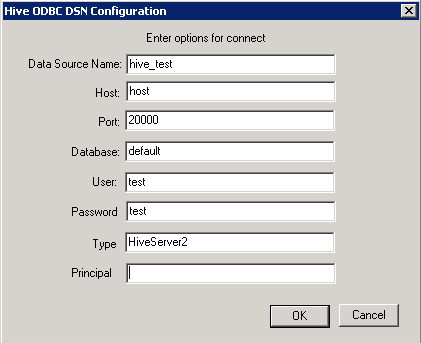
ka02R000000kYZ9QAM_0EM440000002JDK.png
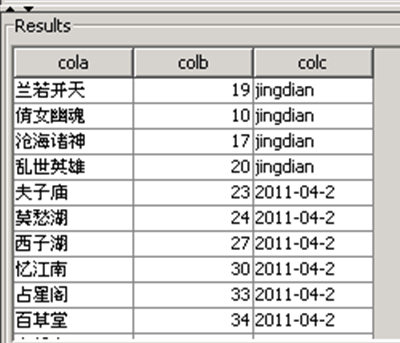
  • From DB query tool, the Chinese characters display well as below:
ka02R000000kYZ9QAM_0EM440000002JDO.png
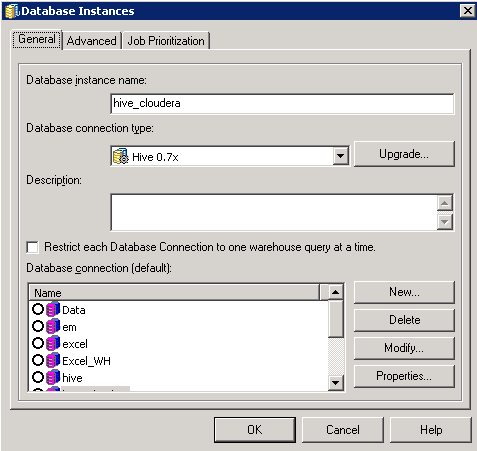
  • Create database instance against Hive using the DSN created in the first step as below:
ka02R000000kYZ9QAM_0EM440000002JDN.png
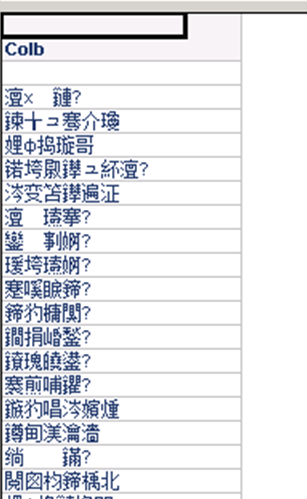
  • Import Hive table through Warehouse Catalog and create attribute. Add the attribute to a report, and it runs as below:
ka02R000000kYZ9QAM_0EM440000002JDH.png

CAUSE:
This is a known issue in Strategy Developer 9.4.1 with Hive ODBC Driver from Cloudera.


Comment

0 comments

Details

Knowledge Article

Published:

June 7, 2017

Last Updated:

June 7, 2017