In order to troubleshoot the network issues , it is possible to track and log all communications at the mobile API layer between the Strategy Mobile and Intelligence Server. To configure these diagnostics follow the steps below:
Step 1: Load Strategy mobile administration page
Step 2: Select " Configuration" link under Diagnostics section.
Step 3: 'Enable XML-API logger' under the 'Advanced Logger Options'
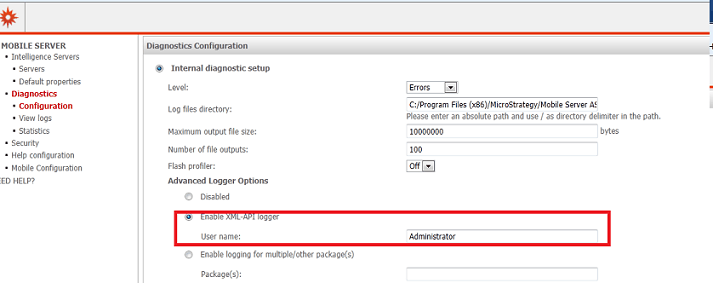
Note: Use the 'full name' to specify Strategy user's full name,such as "Robert Smith" for example .This will log messages that are generated for this particular user.
NOTE: Tracing should be enabled for specific troubleshooting purposes. Do not to leave tracing enabled for extended periods of time because doing so will adversely affect performance. Once mobile xml log is enabled, the xml log should be generated under Strategy Mobile deployment path\WEB-INF\log
KB09715
