EducationSoftwareStrategy.com
StrategyCommunity

Knowledge Base

Product

Community

Knowledge Base

TopicsBrowse ArticlesDeveloper Zone

Product

Download SoftwareProduct DocumentationSecurity Hub

Education

Tutorial VideosSolution GalleryEducation courses

Community

GuidelinesGrandmastersEvents
x_social-icon_white.svglinkedin_social-icon_white.svg
Strategy logoCommunity

© Strategy Inc. All Rights Reserved.

LegalTerms of UsePrivacy Policy
  1. Home
  2. Topics

KB44946: Document Auto-Refresh in MicroStrategy Web 9.4.0 and upper


Community Admin

• Strategy


This document shows auto-refresh feature in MicroStrategy Web 9.4.0 and uppper

New feature in Strategy Web 9.4.0 is introduced for documents that allows the developers to configure a document to auto-refresh itself after particular amount of time in seconds. The auto-refresh invalidates the document cache on client devices and new caches will be created and retrieved.
 
STEPS TO FOLLOW
  • Select 'Tools' from the toolbar in Strategy Web.
  • Select 'Document Properties'.
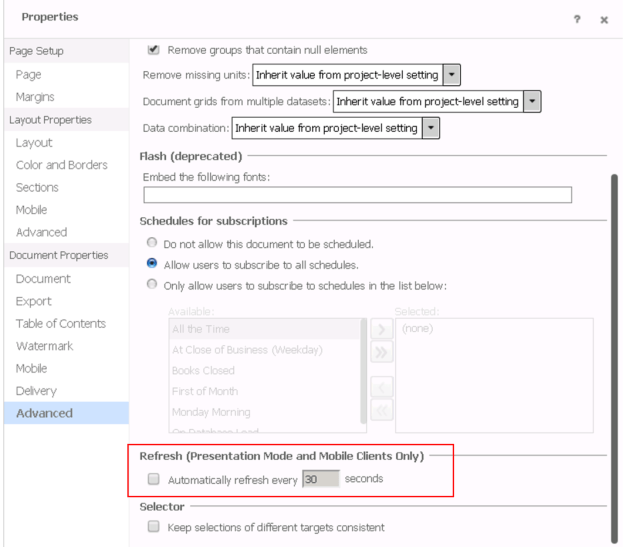
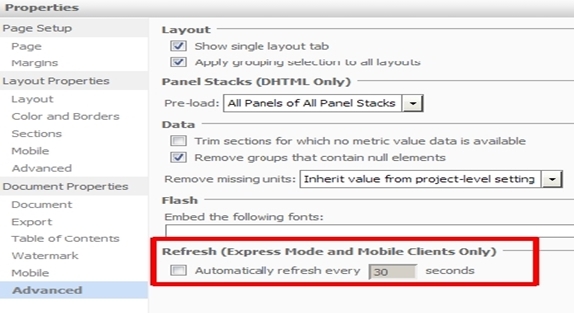
  • Click on 'Advanced' > "Refresh' section
    9.4.x and 9.5.x: 
ka04W000000Odg0QAC_0EM440000002ABX.jpeg

10.x:

ka04W000000Odg0QAC_0EM440000002IS4.png

NOTE:
This feature was available for Mobile clients starting from MSTR 9.3.1. MSTR 9.4 introduces the feature for Web in Express Mode only.


Comment

0 comments

Details

Knowledge Article

Published:

April 6, 2017

Last Updated:

April 6, 2017