EducationSoftwareStrategy.com
StrategyCommunity

Knowledge Base

Product

Community

Knowledge Base

TopicsBrowse ArticlesDeveloper Zone

Product

Download SoftwareProduct DocumentationSecurity Hub

Education

Tutorial VideosSolution GalleryEducation courses

Community

GuidelinesGrandmastersEvents
x_social-icon_white.svglinkedin_social-icon_white.svg
Strategy logoCommunity

© Strategy Inc. All Rights Reserved.

LegalTerms of UsePrivacy Policy
  1. Home
  2. Topics

KB44977: After enabling Flash documents to be embedded into PDF when exporting, document export still generates a MHT file instead of PDF and cannot be opened in a browser using MicroStrategy Web.


Community Admin

• Strategy


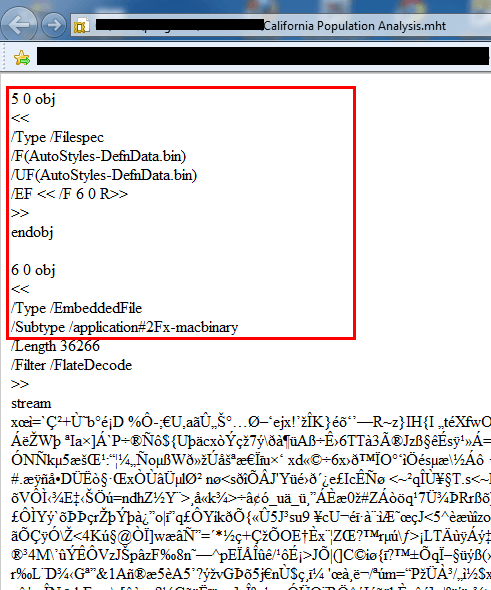
After changing the project level setting to export Flash as PDF instead of MHT, exporting from MicroStrategy Web still generates a .MHT file instead of PDF. When attempting to open the MHT file, it appears corrupted - displaying illegible characters.

DESCRIPTION
 
After changing the project level setting to export Flash as PDF instead of MHT, exporting from Strategy Web still generates a .MHT file instead of PDF. When attempting to open the MHT file, it appears corrupted - displaying illegible characters.
 
STEPS TO REPRODUCE
 

  • Change project level setting Export Flash to PDF:
ka04W000000uGAqQAM_0EM4400000026VW.jpeg
  • Export to Flash from Strategy Web
ka04W000000uGAqQAM_0EM4400000026VV.png
  • Open MHT file and notice corrupted content.
ka04W000000uGAqQAM_0EM4400000026Vp.png


CAUSE
 
This issue is caused by outdated Strategy Web properties caches after changing the setting and is very similar to the issue described in TN42830 - Even though the project is configured to export Flash documents to .pdf format, documents are still exported to .mht in MicroStrategy Web 9.x. The file extension is incorrect while Intelligence Server sends the correct binary files in PDF format.
 
Note: After changing the .MHT extension to .PDF, the file opens correctly as PDF and displays content with embedded flash dashboard. 
 
SOLUTION
 
It is required to restart the web server running Strategy Web to purge all runtime caches. Alternatively, follow the steps outlined in technical note KB16403: How to Purge Web Caches in MicroStrategy Web and Web Universal 9.x - 10.x


Comment

0 comments

Details

Knowledge Article

Published:

June 7, 2017

Last Updated:

June 7, 2017