EducationSoftwareStrategy.com
StrategyCommunity

Knowledge Base

Product

Community

Knowledge Base

TopicsBrowse ArticlesDeveloper Zone

Product

Download SoftwareProduct DocumentationSecurity Hub

Education

Tutorial VideosSolution GalleryEducation courses

Community

GuidelinesGrandmastersEvents
x_social-icon_white.svglinkedin_social-icon_white.svg
Strategy logoCommunity

© Strategy Inc. All Rights Reserved.

LegalTerms of UsePrivacy Policy
  1. Home
  2. Topics

KB44982: When renaming a shortcut to an attribute, and then adding it to a report, the name is lost, and reverts back to the original attribute name, in MicroStrategy 9.4.x-10.x


Stefan Zepeda

Salesforce Solutions Architect • Strategy


When renaming a shortcut to an attribute, and then adding it to a report, the name is lost, and reverts back to the original attribute name, in MicroStrategy 9.4.x-10.x

SYMPTOM:
When renaming a shortcut to an attribute, and then adding it to a report, the name is lost, and reverts back to the original attribute name, in Strategy 9.4.x-10.x.
 
STEPS TO REPRODUCE:
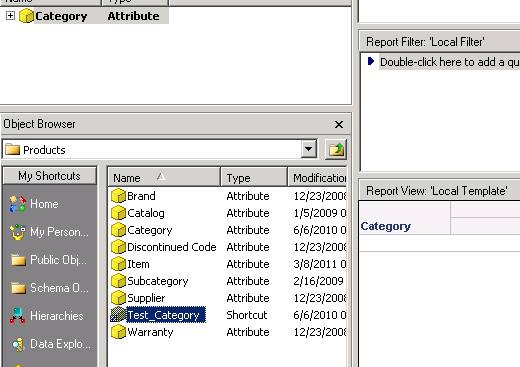
1. Pick an attribute (e.g. Category). Create a shortcut to this attribute, and rename it "Test Category".
2. Create a new report
3. Drag and drop the shortcut to the attribute onto the report template
4. The attribute displays the original name, not the new name given in step 1
ka02R000000kcSMQAY_0EM440000002CaW.png

 
CAUSE:
This is a known issue in Strategy 9.4.x-10.x.
 
ACTION:
Strategy will continue to investigate and post updates as soon as they are available.
 
WORKAROUND:
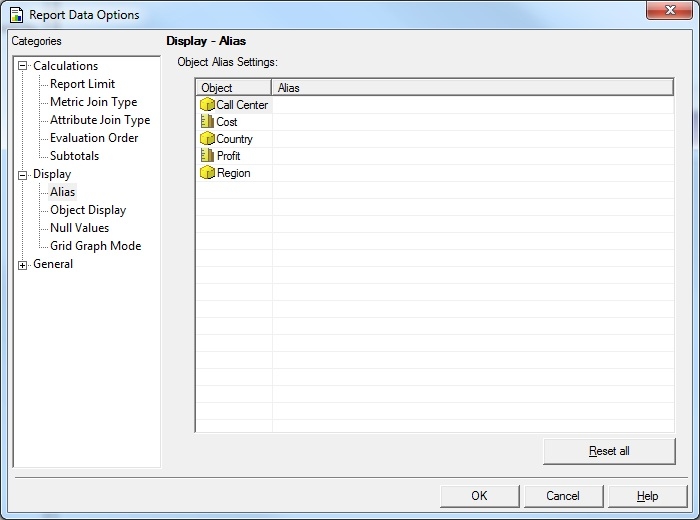
Rename the attribute using an alias. This can be done in the report template via Report Data Options > Display > Alias:
ka02R000000kcSMQAY_0EM440000002CaX.jpeg

Comment

0 comments

Details

Knowledge Article

Published:

April 19, 2017

Last Updated:

April 19, 2017