EducationSoftwareStrategy.com
StrategyCommunity

Knowledge Base

Product

Community

Knowledge Base

TopicsBrowse ArticlesDeveloper Zone

Product

Download SoftwareProduct DocumentationSecurity Hub

Education

Tutorial VideosSolution GalleryEducation courses

Community

GuidelinesGrandmastersEvents
x_social-icon_white.svglinkedin_social-icon_white.svg
Strategy logoCommunity

© Strategy Inc. All Rights Reserved.

LegalTerms of UsePrivacy Policy
  1. Home
  2. Topics

KB44986: Fill color of an attribute set to use as a selector does not display as expected in Express Mode in MicroStrategy Web 9.3.1.


Community Admin

• Strategy


Fill color of an attribute set to use as a selector does not display as expected in Express Mode in MicroStrategy Web 9.3.1.

SYMPTOM:
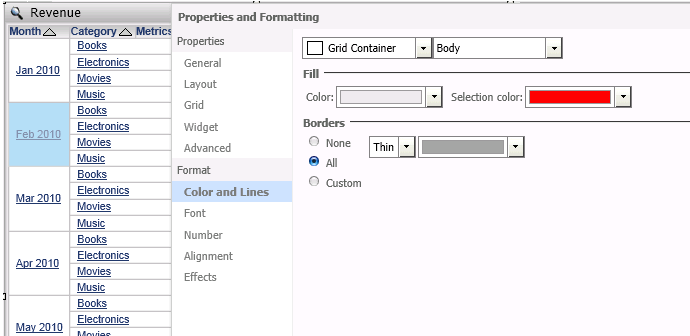
By default, the color set for a selection in a grid is set to a light blue color. This can be changed in the Properties and Formatting options, like shown below: 
ka04W000000Oh7GQAS_0EM4400000026T5.png

When setting this color to something other than the default (e.g. red), the correct color is not reflected in the grid when the document is executed in Express mode. Instead, it appears as a mixture of the default and the selected color:

ka04W000000Oh7GQAS_0EM4400000026TB.png

 
STEPS TO REPRODUCE:
1. Create a dashboard with two grids. One main grid, and one to act as a selector. 
2. On the element to be used as a selector, right mouse click, select properties, and format the selection color as per KB34887.
3. Select an element on the grid and confirm the color shown - it will not appear as the same color selected, but a mixture of the default and the selection:

ka04W000000Oh7GQAS_0EM4400000026T3.png


CAUSE:
This is a known issue in Strategy Web 9.3.1.
 
ACTION:
Please contact Strategy Technical Support for an update.
 
WORKAROUND:
Run the dashboard in Flash mode to display the correct selection color:

ka04W000000Oh7GQAS_0EM4400000026T7.png


Comment

0 comments

Details

Knowledge Article

Published:

June 2, 2017

Last Updated:

June 2, 2017