EducationSoftwareStrategy.com
StrategyCommunity

Knowledge Base

Product

Community

Knowledge Base

TopicsBrowse ArticlesDeveloper Zone

Product

Download SoftwareProduct DocumentationSecurity Hub

Education

Tutorial VideosSolution GalleryEducation courses

Community

GuidelinesGrandmastersEvents
x_social-icon_white.svglinkedin_social-icon_white.svg
Strategy logoCommunity

© Strategy Inc. All Rights Reserved.

LegalTerms of UsePrivacy Policy
  1. Home
  2. Topics

KB45014: Why is change journaling required to be enabled when enabling Web Quick Search in MicroStrategy 9.3.x and above?


Community Admin

• Strategy


Change Journal (CJ) is used by the search engine to keep track of changes to the metadata.

Change Journal (CJ) is used by the search engine to keep track of changes to the metadata. During an incremental update of the search index which can be triggered by the Administrator and when the search engine is turned off, it is therefore not capturing the real time update notifications.
 
Thus Quick Search (QS) has been designed to rely on Change Journaling and therefore disabling change journaling disables the Quick Search.
 
The current behavior is as follows:

  • When enabling QS, if CJ is off: CJ is turned on.
  • When enabling QS, if CJ is on: No action.
  • When disabling QS, if CJ is off: No action.
  • When disabling QS, if CJ is on: No action.
  • When disabling CJ, if QS is off: No action.
  • When disabling CJ, if QS is on: QS is turned off.

Quick Search for Strategy Web is enabled at the server level via Strategy Intelligence Server Configuration > Web Quick Search > General:


ka04W000000OeW9QAK_0EM4400000029Va.png


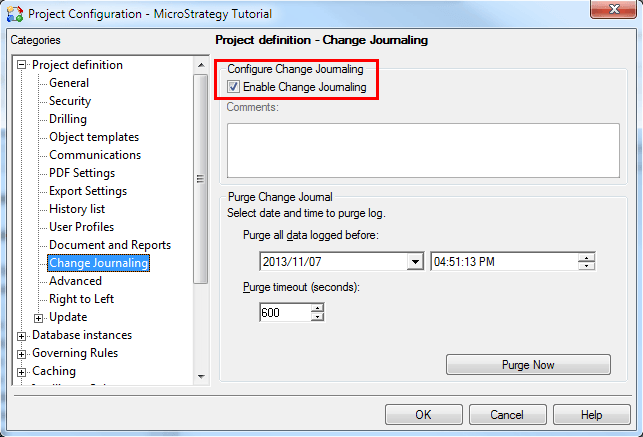
Change Journaling is enabled at the project level via Project Configuration > Project Definition > Change Journaling:
  

ka04W000000OeW9QAK_0EM4400000029Vg.png


For further information on the above access the help section in Desktop under System Administration > "Quick Search Manager" and "Enabling or disabling change journaling for a project source".
 
For more information on Web Quick Search, refer to TN41444 - New Quick Search feature in MicroStrategy 9.3.0 Web.


Comment

0 comments

Details

Knowledge Article

Published:

June 9, 2017

Last Updated:

June 9, 2017