SYMPTOM:
When trying to connect to Salesforce.com using the Strategy OBDC Driver for Salesforce (following the instructions found in KB38305: How to configure MicroStrategy 9.x and 10.x on Linux to connect to Salesforce.com using MicroStrategy ODBC Driver for Salesforce), an error is encountered if the user tries to access the database tables using the Strategy DB Query Tool or ODBC Test Tool in Linux in Strategy 9.x or 10.x. After copying the Salesforce information over from the obdc.ini.example file into the obdc.ini file and editing the appropriate information in the obdc.ini file, if the user tries to access the database using the DB Query Tool, the following error occurs:
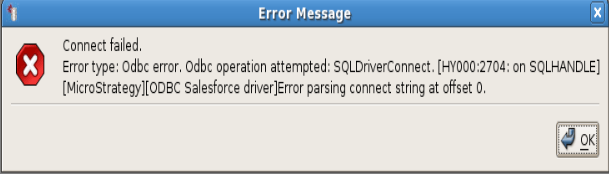
CAUSE:
This parsing error occurs because the parenthesis in the "ConfigOptions" line from the obdc.ini.example file is copied over/included in the obdc.ini file. In this scenario, the "ConfigOptions" line should look like the following:
ConfigOptions=(AuditColumns=AuditOnly;MapSystemColumnNames=0;CustomSuffix=Include)
ACTION:
Remove the parenthesis in the "ConfigOptions" line in the obdc.ini file and save the changes. The "ConfigOptions" line should now look like the following:
ConfigOptions=AuditColumns=AuditOnly;MapSystemColumnNames=0;CustomSuffix=Include
KB45033
