EducationSoftwareStrategy.com
StrategyCommunity

Knowledge Base

Product

Community

Knowledge Base

TopicsBrowse ArticlesDeveloper Zone

Product

Download SoftwareProduct DocumentationSecurity Hub

Education

Tutorial VideosSolution GalleryEducation courses

Community

GuidelinesGrandmastersEvents
x_social-icon_white.svglinkedin_social-icon_white.svg
Strategy logoCommunity

© Strategy Inc. All Rights Reserved.

LegalTerms of UsePrivacy Policy
  1. Home
  2. Topics

KB45069: "Follow the instructions marked below by a red flag." error message appears after changing the prompted date format to dd-MM-yyyy in format_config.xml file in MicroStrategy Web 9.4.1 - 10.6 using Apache Tomcat in Red Hat Linux.


Community Admin

• Strategy


"Follow the instructions marked below by a red flag." error message appears after changing the prompted date format to dd-MM-yyyy in format_config.xml file in MicroStrategy Web 9.4.1 - 10.6 using Apache Tomcat in Red Hat Linux

SYMPTOM:
"Follow the instructions marked below by a red flag." error message appears after changing the prompted date format to dd-MM-yyyy in format_config.xml file in Strategy Web 9.4.1 - 10.6 using Apache Tomcat in Red Hat Linux, as shown below:
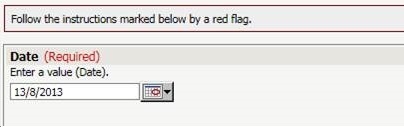
ka04W000000OhUDQA0_0EM4400000026VP.jpeg

 
STEPS TO REPRODUCE:

  1. Deploy Strategy Web in Apache Tomcat in Red Hat Linux.
  2. Modify the format_config.xml file in the following way:
    Search for "US" for the locale. Modify the date display to follow the order: day/month/year.(The default one is month/day/year)
     
     Sample Code:


    <data-type name="date">
    
       <out>d/M/yyyy</out>
    
       <in>d/M/yy</in>
    
       <in>d/M/yyyy</in>
    
       <in>d MMM, yy</in>
    
    <display>d/M/yy</display>


  3. Restart the Apache Tomcat  web server.
  4. Set the locales for Web Server and Browsers as US.
  5. Create a report with attribute Day and create a value prompt filter on Day.
  6. Create a Report Services document with the report created above.
  7. Run the Report Services document in Web. "Follow the instructions marked below by a red flag." message appears when selecting a date greater than 12 of each month.

CAUSE:
This is a known issue with Strategy Web 9.4.1-10.6 using Apache Tomcat in Red Hat Linux.
 
ACTION:
This issue has been addressed in Strategy 10.7. Upgrade to take advantage of the fix.


Comment

0 comments

Details

Knowledge Article

Published:

May 17, 2017

Last Updated:

May 17, 2017