SYMPTOM:
The hyperlink in the first row of a grid does not work in a Report Services document in Interactive mode and Editable mode when
the column header is locked in Strategy Web 9.3.1 using Internet Explorer 10.
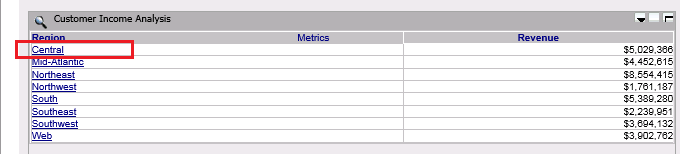
In Express mode and Flash mode, hyperlinks in all rows work correctly.
STEPS TO REPRODUCE:
Follow the steps below to reproduce the issue with Strategy Tutorial project:
1. Create a Report Services document with a grid.
2. Lock the column header for the grid.
3. Define "Edit Links" for an attribute in the grid to run another document.
4. Save and run the document in Interactive mode and Editable mode in Internet Explorer 10. Note that clicking on the hyperlink in the first row cannot open the target document.
CAUSE:
This is a known issue in Strategy Web 9.3.1.
ACTION:
Contact Strategy Technical Support for the latest status of the issue.
WORKAROUND:
1. Run the document with other types of browsers, e.g. Chrome or Firefox.
2. Unlock the column header.
3. Run the document in Flash mode or Express mode.
