EducationSoftwareStrategy.com
StrategyCommunity

Knowledge Base

Product

Community

Knowledge Base

TopicsBrowse ArticlesDeveloper Zone

Product

Download SoftwareProduct DocumentationSecurity Hub

Education

Tutorial VideosSolution GalleryEducation courses

Community

GuidelinesGrandmastersEvents
x_social-icon_white.svglinkedin_social-icon_white.svg
Strategy logoCommunity

© Strategy Inc. All Rights Reserved.

LegalTerms of UsePrivacy Policy
  1. Home
  2. Topics

KB45080: The "ETL Service Status and Data Load Failures" Health Center system check encounters errors even when there are not errors in the MSTRMigration.log in MicroStrategy Health Center 9.x


Community Admin

• Strategy


The "ETL Service Status and Data Load Failures" Health Center system check encounters errors even when there are not errors in the MSTRMigration.log in MicroStrategy Health Center 9.x

SYMPTOM:
 
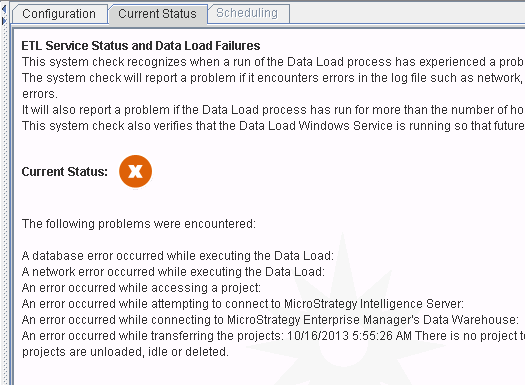
Users notice that the "ETL Service Status and Data Load Failures" system check encounters errors.  This system check, looks for any errors within the MSTRMigration.log.  Upon clearing the log file so there are no more errors, the Health Center system check still encounters errors as seen below.
 

ka04W000000Oh4KQAS_0EM4400000029UD.png

 
CAUSE:
 
The "ETL Service Status and Data Load Failures" system check will indicate an error if the MSTRMigration.log is empty.  In order to have this system check pass successfully, there must be at least 1 successful data load within the MSTRMigration.log and none with errors.  Additionally, the length of the migration process cannot exceed the "Waiting Period" configuration value set for the system check.
 
ACTION:
 
Ensure that there are valid data migration entries in the MSTRMigration.log located at C:\Program Files\Strategy\Enterprise Manager.  Also ensure that none of these entries resulted in an error.


Comment

0 comments

Details

Knowledge Article

Published:

June 5, 2017

Last Updated:

June 5, 2017