EducationSoftwareStrategy.com
StrategyCommunity

Knowledge Base

Product

Community

Knowledge Base

TopicsBrowse ArticlesDeveloper Zone

Product

Download SoftwareProduct DocumentationSecurity Hub

Education

Tutorial VideosSolution GalleryEducation courses

Community

GuidelinesGrandmastersEvents
x_social-icon_white.svglinkedin_social-icon_white.svg
Strategy logoCommunity

© Strategy Inc. All Rights Reserved.

LegalTerms of UsePrivacy Policy
  1. Home
  2. Topics

KB45094: Error message “Failed to execute:‘exec cp_ModifyTableColumnType_CharToUniqueidentifier \r\nDSSMDOBJDEPN.”appears when upgrading metadata


Community Admin

• Strategy


SYMPTOM:
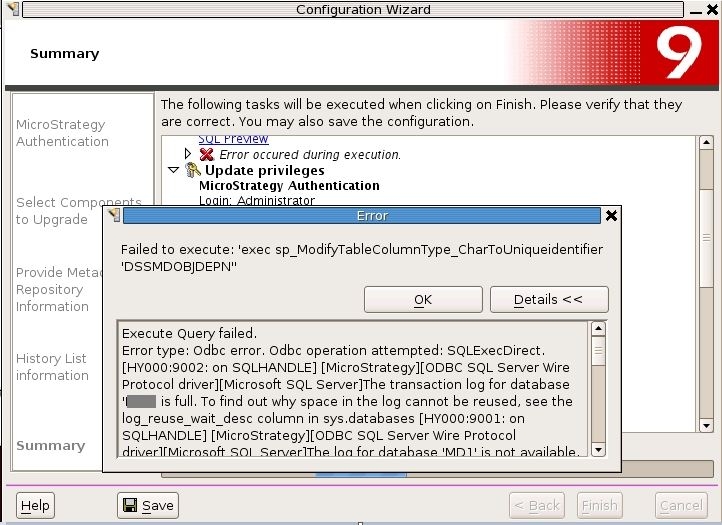
When upgrading a SQL Server metadata via Configuration Wizard, the following error message occurs.
 

ka04W000000OhClQAK_0EM440000002JD1.jpeg

 
Sample Code/Error
'Failed to execute:'exec cp_ModifyTableColumnType_CharToUniqueidentifier 'DSSMDOBJDEPN".'
 
 
Click the 'Details' button in the screenshot, the following error messages are captured.
 
Sample Code/Error
Execute Query failed. Error type: Odbc error. Odbc operation attempted: SQLExecDirect. The transaction log for database "MD1" is full. To find out why space in the log cannot be reused, see the log_reuse_wait_desc column in sys.databases The log for database "MD1" is not available. Check the event log for related error messages. Resolve any errors and restart the database. Warning: Fatal error 3314 occurred at Sep 12 2013 3:36AM. Note the error and time, and contact your system administrator. Warning: Fatal error 3314 occurred at Sep 12 2013 3:36AM. Note the error and time, and contact your system administrator. Warning: Fatal error 3314 occurred at Sep 12 2013 3:36AM. Note the error and time, and contact your system administrator. The log for database "MD1" is not available. Check the event log for related error messages. Resolve any errors and restart the database. The log for database "MD1" is not available. Check the event log for related error messages. Resolve any errors and restart the database. The statement has been terminated.
 
 
CAUSE:
 
There are two possible causes that lead to the errors.
 

  1. The maximum file size of the log file is reached. No enough space to to host the transaction logs generated during the metadata update.
  2. There is insufficient free memory on the intelligence server. 


ACTION:


  • Increase the size limit of the log file of metadata database and make it big enough to host the transaction logs generated during the metadata update. In this case, at least give it 25GB space to grow.
  • Make sure there is sufficient free memory on the server. In this case, decrease the max memory that the database instance can use, so that more memory were released for the host machine. At least 2GB free memory should be available during the upgrade.


Comment

0 comments

Details

Knowledge Article

Published:

May 30, 2017

Last Updated:

May 30, 2017