EducationSoftwareStrategy.com
StrategyCommunity

Knowledge Base

Product

Community

Knowledge Base

TopicsBrowse ArticlesDeveloper Zone

Product

Download SoftwareProduct DocumentationSecurity Hub

Education

Tutorial VideosSolution GalleryEducation courses

Community

GuidelinesGrandmastersEvents
x_social-icon_white.svglinkedin_social-icon_white.svg
Strategy logoCommunity

© Strategy Inc. All Rights Reserved.

LegalTerms of UsePrivacy Policy
  1. Home
  2. Topics

KB45141: A Transaction Services Document will submit the transaction even when the option "Input is required" is enabled for a field and that field is empty in MicroStrategy Web


Community Admin

• Strategy


In a Transaction Services document, if a field has the option "input is required" enabled, leaving that field blank still allows the document to submit/update itself, in MicroStrategy Web.

SYMPTOM:
In a Transaction Services document, if a field has the option "input is required" enabled, leaving that field blank still allows the document to submit/update itself, in Strategy Web 9.x.
 
STEPS TO REPRODUCE:
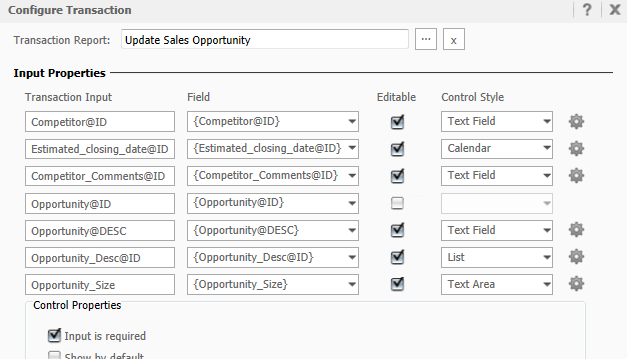
  •  In the Strategy Tutorial project, go to Shared Reports > Strategy Platform Capabilities > Strategy Transaction Services.
  • Run the Opportunity Management document.
  • In Design Mode for that document, configure the transaction so that the Opportunity Size field has the option "Input is required," as shown below:
     
ka04W00000148OHQAY_0EM4400000026U3.png
  • Run the document in Express Mode.
  • Erase anything in the Opportunity Size field so that it is empty and click Submit.
  • Notice, the document is now updated and the pop-up for "input is required" is not shown, as shown below:

ka04W00000148OHQAY_0EM4400000026UE.png
  •  


    Strategy Web
    OK, opportunity was updated.


CAUSE:
This is a known issue with Strategy Web 9.x. The document should not be submitted if a required field is left blank.
 
ADDITIONAL TROUBLESHOOTING:

  1. Double-check the behavior in Strategy Mobile. In Mobile, it should not allow you to update the transaction when a required field is left blank.
  2. Double-check your input properties in the Configure Transaction dialog box. Try another Control Style for your Transaction Input besides Text Field and see if the issue still exists.


KB45141


Comment

0 comments

Details

Knowledge Article

Published:

June 19, 2017

Last Updated:

December 28, 2018