EducationSoftwareStrategy.com
StrategyCommunity

Knowledge Base

Product

Community

Knowledge Base

TopicsBrowse ArticlesDeveloper Zone

Product

Download SoftwareProduct DocumentationSecurity Hub

Education

Tutorial VideosSolution GalleryEducation courses

Community

GuidelinesGrandmastersEvents
x_social-icon_white.svglinkedin_social-icon_white.svg
Strategy logoCommunity

© Strategy Inc. All Rights Reserved.

LegalTerms of UsePrivacy Policy
  1. Home
  2. Topics

KB45159: Passing selections from a grid as selector using Edit Links does not work in Interactive or Editable mode in MicroStrategy Web 9.3.1


Community Admin

• Strategy


SYMPTOM:
Selections made on a grid as selector are not passed correctly to a target document using Edit Links in Strategy Web 9.3.1 only for Interactive or Editable modes. The selector would be set to the All option even though a specific selection was made before linking.
 
STEPS TO REPRODUCE:
  • Create a report with the Year attribute.
  • Create two documents using this report as the dataset. Name one "Source" and the other "Target."
  • In the Target document, add a grid with the Year attribute.
  • Add a selector with the Year attribute that targets the grid made in Step 3.
  • In the Source document, add two grids with the Year attribute.
  • In one of the grids, right-click the Year attribute and select "Use as Selector".
  • Configure this selector to target the other grid.
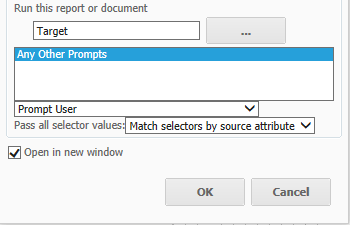
  • In the grid from Step 6, right-click the Year attribute again and select "Edit Links..."
  • Under "Run this report or document", browse for the "Target" document.
     
ka04W000001MKrMQAW_0EM4400000026Ty.png
  • For the "Pass all selector values" dropdown, select "Match selectors by source attribute".
  • Run the Source document in Express and Flash modes.


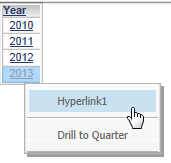
  • Select/Click an element from the grid and then from the dropdown menu, select "Hyperlink1".
     
ka04W000001MKrMQAW_0EM4400000026Tj.png
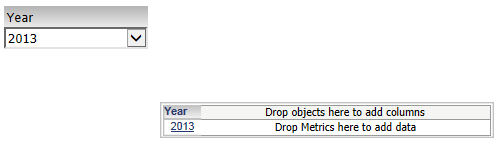
  • The selected element is correctly passed to the Target document:
ka04W000001MKrMQAW_0EM4400000026Tx.png
  • Note: The selection passes correctly in Express and Flash modes.  In interactive and editable the problem behavior will surface.
     
  • Run the Source document in Interactive or Editable modes.

ka04W000001MKrMQAW_0EM4400000026Tu.png
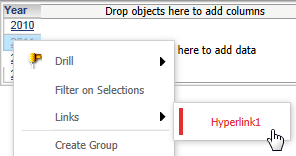
  • Select an element from the grid and then right-click the element and navigate to Links > Hyperlink1.

ka04W000001MKrMQAW_0EM4400000026Tk.png
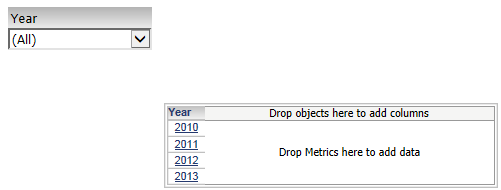
  • Note: The selection is not passed and the selector displays the All option.

CAUSE:
This is an identified defect with Strategy Web 9.3.1.
 
ACTION:
This issue has been addressed in Strategy Web 9.4.0. Upgrade to this version to take advantage of this fix.
 
WORKAROUND:
Users can configure edit links using textboxes in the same way. In this configuration, the selections are passed to the Target document.


Comment

0 comments

Details

Knowledge Article

Published:

April 4, 2017

Last Updated:

April 4, 2017