EducationSoftwareStrategy.com
StrategyCommunity

Knowledge Base

Product

Community

Knowledge Base

TopicsBrowse ArticlesDeveloper Zone

Product

Download SoftwareProduct DocumentationSecurity Hub

Education

Tutorial VideosSolution GalleryEducation courses

Community

GuidelinesGrandmastersEvents
x_social-icon_white.svglinkedin_social-icon_white.svg
Strategy logoCommunity

© Strategy Inc. All Rights Reserved.

LegalTerms of UsePrivacy Policy
  1. Home
  2. Topics

KB45189: "Setup has detected MicroStrategy components running MicroStrategy Welcome Screen" message is encountered when trying to perform an uninstallation in MicroStrategy 9.x & 10.x


Community Admin

• Strategy


SYMPTOM:
 
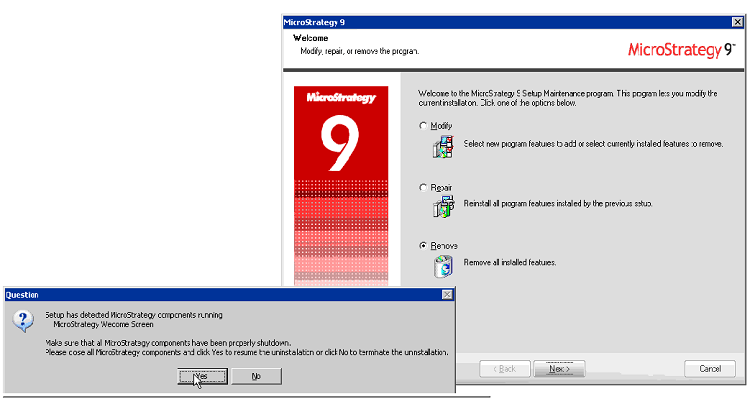
Users are prompted with a request to make sure that all Strategy 9.x and 10.x components have been properly shutdown even though there are no Strategy components running in Microsoft Windows.
 

ka04W000000OeKSQA0_0EM440000002HK2.png


Setup has detected Strategy componetns running
   Strategy Welcome Screen

Make sure that all Strategy components have been properly shutdown.
Please close all Strategy components and click Yes to resume the    uninstallation or click No to terminate the uninstallation

 
CAUSE:
 
This message can be encountered if the Strategy Listener process is running.
 
 
ACTION:
 
Terminate the Strategy Listener process by following these instructions.
 
1. Open Windows Task Manager.
2. Select "Show processes from all users".
3. Locate MSTRLsn2_64.exe process and End Process
4. Continue with the un-installation of Strategy components.


Comment

0 comments

Details

Knowledge Article

Published:

June 12, 2017

Last Updated:

June 12, 2017