EducationSoftwareStrategy.com
StrategyCommunity

Knowledge Base

Product

Community

Knowledge Base

TopicsBrowse ArticlesDeveloper Zone

Product

Download SoftwareProduct DocumentationSecurity Hub

Education

Tutorial VideosSolution GalleryEducation courses

Community

GuidelinesGrandmastersEvents
x_social-icon_white.svglinkedin_social-icon_white.svg
Strategy logoCommunity

© Strategy Inc. All Rights Reserved.

LegalTerms of UsePrivacy Policy
  1. Home
  2. Topics

KB45225: A user cannot see the privileges options of “Web Create Analysis” , “Web Save Analysis”, and “Web Visual Insight” when creating a security role to give user an access to create, modify, and save the visual insight analysis.


Stefan Zepeda

Salesforce Solutions Architect • Strategy


A user cannot see the privileges options of “Web Create Analysis” , “Web Save Analysis”, and “Web Visual Insight” when creating a security role to give user an access to create, modify, and save the visual insight analysis.

SYMPTOM:
 
When an administrator tries to give a user an access to create, modify, and save the visual insight analysis, the administrator cannot see privilege option “Web Create Analysis” , “Web Save Analysis”, “Web Visual Insight” options in Strategy 9.3.x and later.
 
CAUSE:
 
Strategy 9.3.x and up renamed the privilege options "Web Create Analysis", "Web Save Analysis", "Web Visual Insight" to "Web Create Dashboard", "Web Edit Dashboard", and "Web Save Dashboard".
 
(Strategy 9.2.1)
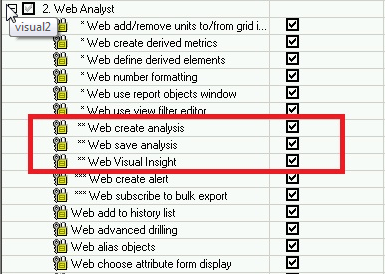
 

ka02R000000kX66QAE_0EM440000002Car.png

 
(Strategy 9.3.0)

ka02R000000kX66QAE_0EM440000002Cap.png

 
ACTION:
 
Grant the user the renamed privilege options of "Web Create Dashboard", "Web Edit Dashboard", and "Web Save Dashboard" for a Visual Insight Analysis access.


Comment

0 comments

Details

Knowledge Article

Published:

April 10, 2017

Last Updated:

April 10, 2017