EducationSoftwareStrategy.com
StrategyCommunity

Knowledge Base

Product

Community

Knowledge Base

TopicsBrowse ArticlesDeveloper Zone

Product

Download SoftwareProduct DocumentationSecurity Hub

Education

Tutorial VideosSolution GalleryEducation courses

Community

GuidelinesGrandmastersEvents
x_social-icon_white.svglinkedin_social-icon_white.svg
Strategy logoCommunity

© Strategy Inc. All Rights Reserved.

LegalTerms of UsePrivacy Policy
  1. Home
  2. Topics

KB45245: MAEMETLS.exe process appears in the Windows Task Manager but no data load runs by schedule with MicroStrategy Enterprise Manager 9.x and 10.x


Community Admin

• Strategy


MAEMETLS.exe process appears in the Windows Task Manager but no data load runs by schedule with MicroStrategy Enterprise Manager 9.x and 10.x

SUMMARY:
This issue has been classified as a non-Strategy issue. The impact is limited to Strategy Enterprise Manager dataload process. There is a resolution provided in the ACTION field and additional references on the same symptom with different causes listed at the bottom of this technical note.
 
SYMPTOM:
Scheduled data load does not kick off even though MAEMETLS.exe process (Enterprise Manager Data Loader Service) appears running in Services. All other relevant settings are checked and are as per requirements.
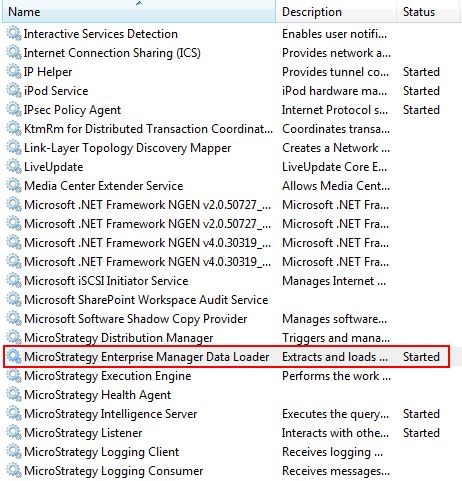
 

ka04W000000Oh6aQAC_0EM4400000029Ub.jpeg


CAUSE:
Some inconsistency with Citrix Server hosting the Enterprise Manager machine causes this issue. No additional details can be disclosed but the action provided below will resolve the issue.
 
ACTION:
Restart the Citrix server to address this issue. After this, the scheduled data loads run as expected.
 
TO LEARN MORE:

  • TN41843: In Strategy Enterprise Manager 9.x, scheduled dataload does not run.
  • TN16366: Scheduled data load does not start in Strategy Enterprise Manager 9.x.


Comment

0 comments

Details

Knowledge Article

Published:

June 4, 2017

Last Updated:

June 4, 2017