EducationSoftwareStrategy.com
StrategyCommunity

Knowledge Base

Product

Community

Knowledge Base

TopicsBrowse ArticlesDeveloper Zone

Product

Download SoftwareProduct DocumentationSecurity Hub

Education

Tutorial VideosSolution GalleryEducation courses

Community

GuidelinesGrandmastersEvents
x_social-icon_white.svglinkedin_social-icon_white.svg
Strategy logoCommunity

© Strategy Inc. All Rights Reserved.

LegalTerms of UsePrivacy Policy
  1. Home
  2. Topics

KB45252: When editing a freeform SQL report, the view filter "Field" appears differently for the administrator versus other users in MicroStrategy 9.x


Stefan Zepeda

Salesforce Solutions Architect • Strategy


In MicroStrategy 9.x, when the Administrator views a freeform SQL report in design view, the view filter definition appears correctly

SYMPTOM:
 
In Strategy 9.x, when the Administrator views a freeform SQL report in design view, the view filter definition appears correctly.
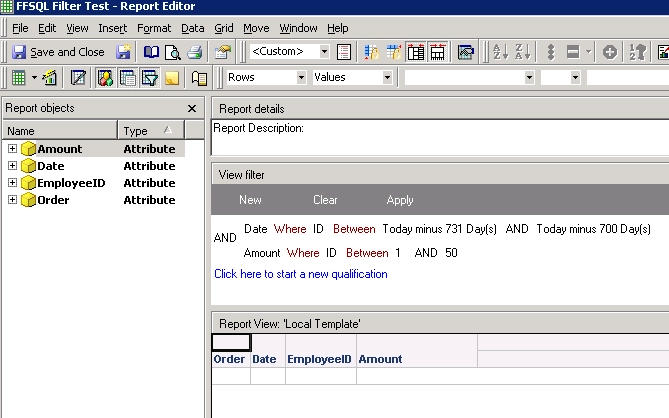
ka02R000000kc5HQAQ_0EM440000002CaG.png


However, when logging in as a different user and editing the report, the "ID" field in the filter is cleared out and defaulted to "Field".  The user will not be able to run the report unless the "Field" is changed back to "ID".
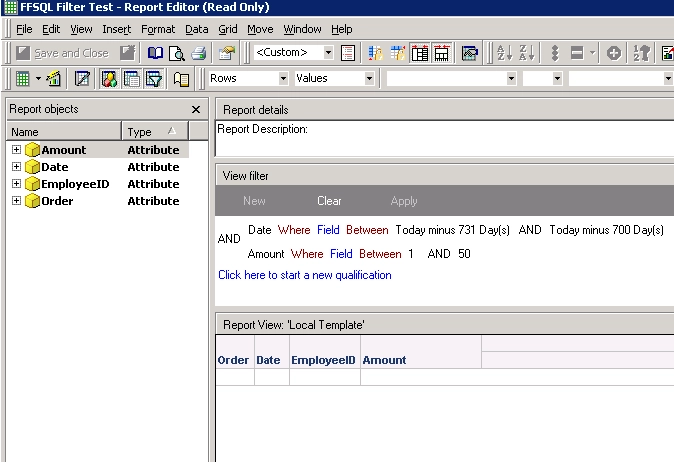
ka02R000000kc5HQAQ_0EM440000002CaI.png


CAUSE:
 
This is a known issue in Strategy 9.x.
 
ACTION
 
Contact Strategy Technical Support for an update on this issue.
 
One workaround is to manually fill in the field prior to report execution.  Alternatively, run the report without going into edit mode and alter the filter within grid view.


Comment

0 comments

Details

Knowledge Article

Published:

May 30, 2017

Last Updated:

May 30, 2017