SYMPTOM:
In a clustered Strategy Intelligence Server environment, the following error message appears when executing an Intelligent Cube report through a Strategy Intelligence Server node different than the one used to its publishing:
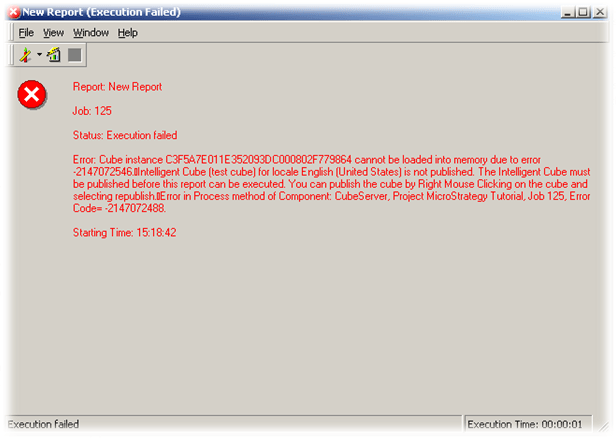
Error: Cube instance xxxx cannot be loaded into memory due to error -2147072546.
Intelligent Cube (xxxx) for locale English (United States) is not published. The Intelligent Cube must be published before this report can be executed. You can publish the
cube by Right Mouse Clicking on the cube and selecting republish. Error in Process method of Component: CubeServer, Project xxxx, Job xxxx, Error Code= -2147072488.
Node A | Node B |
| |
2. A report test cube report based on the referred Intelligent Cube is executed on each node, producing the results below:
Node A | Node B |
| |
3. Both nodes have the same Intelligent Cube file directory:

The location of the image /home/931/cubos is a mounted NFS partition in the same location on each cluster node.
CAUSE:
Strategy Intelligence Server interprets the path in the format /localserverdirectory/subdirectory/ as a relative path for locally-stored files. If this format is used for a shared network location, (like the case of a distributed file system) the files will not be available in the expected location and the synchronization between nodes will not function correctly. The '\\' at the start of the path is required to indicate to the Strategy Intelligence Server that the specified path is a remote location.
ACTION:
1. Replace the first “/” by “\\” in the Intelligent Cube file directory option. This can be done in one node of the cluster because the information is stored in the metadata then used by all cluster nodes:

2. Restart all cluster nodes to apply this configuration.
3. After restarting all cluster nodes and republishing the referred cube in both cluster nodes:
Node A | Node B |
| |
4. The test cube report report will be executed with success in both nodes.
NOTE:
For additional information on how to configure a clustered Cache and Inbox sharing, refer to the Strategy technical note:
KB441125: How to configure Cache, Cube, Inbox, and Session Recovery file sharing for a MicroStrategy Intelligence Server cluster
Third Party Software Installation Warning:
The third-party product(s) discussed in this technical note is manufactured by vendors independent of Strategy. Strategy makes no warranty, express, implied or otherwise, regarding this product, including its performance or reliability.
KB45259
