EducationSoftwareStrategy.com
StrategyCommunity

Knowledge Base

Product

Community

Knowledge Base

TopicsBrowse ArticlesDeveloper Zone

Product

Download SoftwareProduct DocumentationSecurity Hub

Education

Tutorial VideosSolution GalleryEducation courses

Community

GuidelinesGrandmastersEvents
x_social-icon_white.svglinkedin_social-icon_white.svg
Strategy logoCommunity

© Strategy Inc. All Rights Reserved.

LegalTerms of UsePrivacy Policy
  1. Home
  2. Topics

KB45261: Edit Links from a document to a report does not work from the first row in Editable and Interactive modes in Internet Explorer 10 when the column headers are locked, in MicroStrategy Web 9.3.1 Hotfix 2


Community Admin

• Strategy


A user runs a document that contains a grid with Edit Links to navigate to another report. However, the user notices that the link on the first row on the grid does not work in Interactive mode or Editable mode in MicroStrategy Web 9.3.1 Hotfix 2. If the grid is sorted differently, the attribute element that did not work, now works, but the element that displays now on the top row fails. This shows that the problem is only with the first row and not the element. The link works as expected in Express and Flash modes

SYMPTOM:
A user runs a document that contains a grid with Edit Links to navigate to another report. However, the user notices that the link on the first row on the grid does not work in Interactive mode or Editable mode in Strategy Web 9.3.1 Hotfix 2. If the grid is sorted differently, the attribute element that did not work, now works, but the element that displays now on the top row fails. This shows that the problem is only with the first row and not the element. The link works as expected in Express and Flash modes.
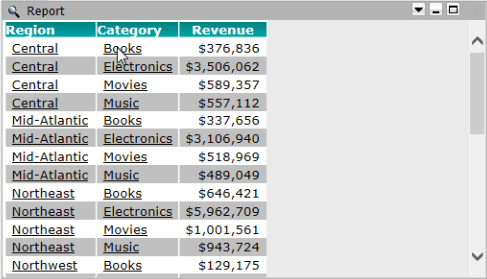
The image below shows that the link from Books is not functional:
ka04W000000Oe9bQAC_0EM4400000026So.png

 
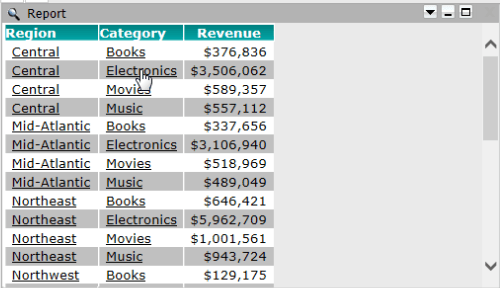
Notice that linking is possible from the second element on the grid:
ka04W000000Oe9bQAC_0EM4400000026Sq.png

 
STEPS TO REPRODUCE:

  1. In Strategy Tutorial, create a report with the Region and Category attributes, and the Revenue metric.
  2. Create a report services document and add the created report as a dataset.
  3. In Properties and Formating of the grid, under Grid tab, lock the Rows and Columns headers.
  4. In Design mode, right mouse click on the Category attribute.
  5. Then in the Edit Links menu, specify a report or document to link to.
  6. Run the document in Internet Explorer 10, in Editable or Interactive mode, to observe the behavior described.

 
CAUSE:
This is a known issue in Strategy Web 9.3.1 Hotfix 2 that only occurs in Internet Explorer 10 when the column headers are locked.
ACTION:
This issue has been addressed in Strategy version 941HF1 please upgrade to take advantage of the fix.
WORKAROUND:
Use one of the following workarounds:

  1. Do not lock the Rows and Columns headers.
  2. Use a different supported browser or a different version of Internet Explorer.
  3. Run the document in Express or Flash modes. 


Comment

0 comments

Details

Knowledge Article

Published:

June 13, 2017

Last Updated:

June 13, 2017