SYMPTOM:
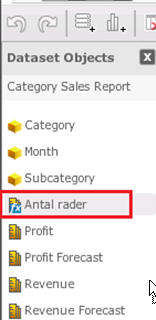
After adding and using a new language in Strategy Web 9.x, which is not included in the "out of the box" deployment, the "Row Count" metric label is either in the wrong language, or blank.
STEPS TO REPRODUCE:
The following steps allow users to reproduce the issue in Strategy 9.x, using the Strategy Tutorial project.
Desktop:
- Administration -> Configuration Managers -> Languages.
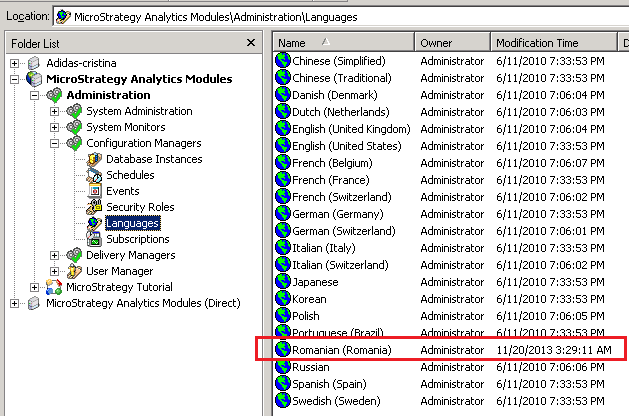
- Right-click -> New -> Language -> Romanian (Romania). This new language should now be shown in the list of languages in Strategy Desktop:
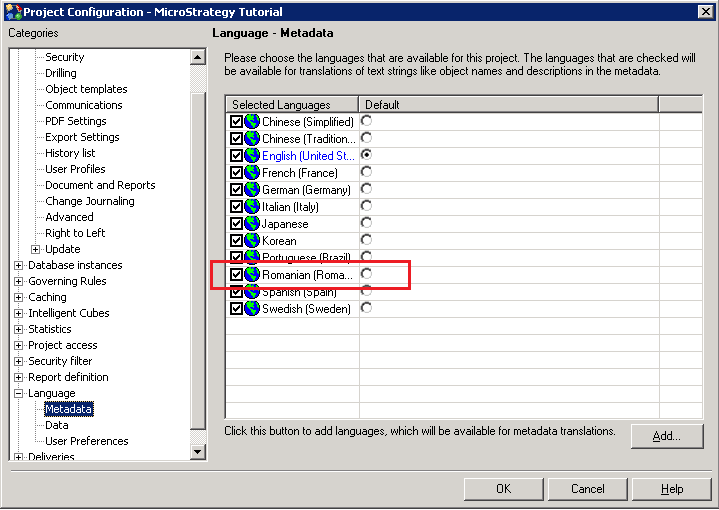
- Right-click on Strategy Tutorial -> Project Configuration -> Language -> Metadata -> Add... -> Romanian (Romania) -> OK.
- Administration -> System Administration -> Project.
- Right-click Strategy Tutorial -> Administer Project -> Unload.
- Wait and refresh until the project shows as unloaded.
- Right-click Strategy Tutorial -> Administer Project -> Load.
- Wait and refresh until the project shows as loaded.
Web:
- Connect to Tutorial as administrator.
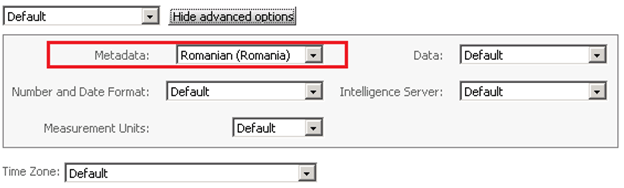
- Preferences -> User Preferences -> General -> Language -> Show advanced options -> Metadata: Select "Romanian (Romania)" and click apply at bottom.
- Log out of Web to apply changes, and reconnect to Tutorial.
- New dashboard -> Pick any report and click Next.
- Select the "grid" visualization, and observe that the "row count" derived metric is shown in a language different to the selected.
CAUSE:
This is a known issue in Strategy Web 9.x. The language shown in Visual Insight in this example is Swedish, although a different language is selected.
ACTION:
Please contact Technical Support for an update on this issue.
