EducationSoftwareStrategy.com
StrategyCommunity

Knowledge Base

Product

Community

Knowledge Base

TopicsBrowse ArticlesDeveloper Zone

Product

Download SoftwareProduct DocumentationSecurity Hub

Education

Tutorial VideosSolution GalleryEducation courses

Community

GuidelinesGrandmastersEvents
x_social-icon_white.svglinkedin_social-icon_white.svg
Strategy logoCommunity

© Strategy Inc. All Rights Reserved.

LegalTerms of UsePrivacy Policy
  1. Home
  2. Topics

KB45288: The setting "Maximum number of categories and series" is not applied when a graph or grid/graph is exported to Excel with formatting in MicroStrategy Web


Community Admin

• Strategy


The setting "Maximum number of categories and series" is not applied when a graph or grid/graph is exported to Excel with formatting in MicroStrategy Web 9.4.1 and above.

SYMPTOM:
In Strategy Web 9.4.1 and above, the setting "Maximum number of categories and series" is not applied when a graph or grid/graph is exported to Excel with formatting.
 
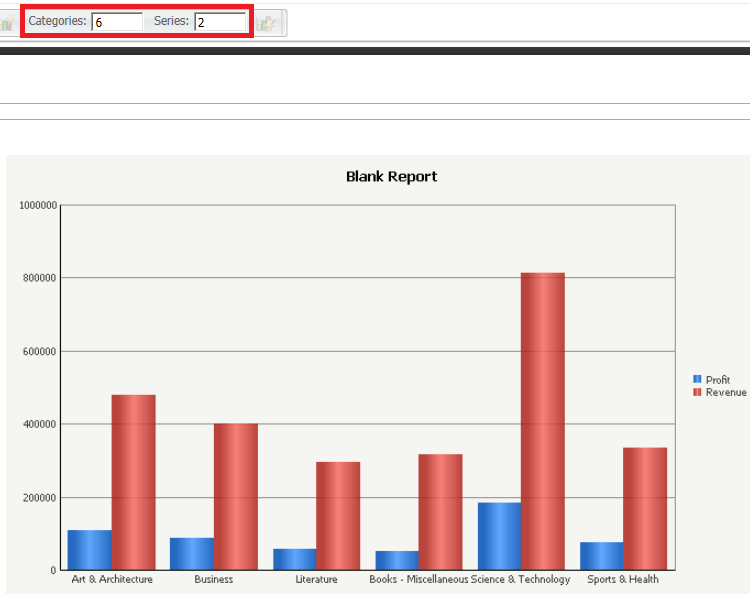
The graph in Strategy Web is shown below set to display only 6 Categories and 2 Series: 
ka04W000000OgIQQA0_0EM4400000026Sx.png

 
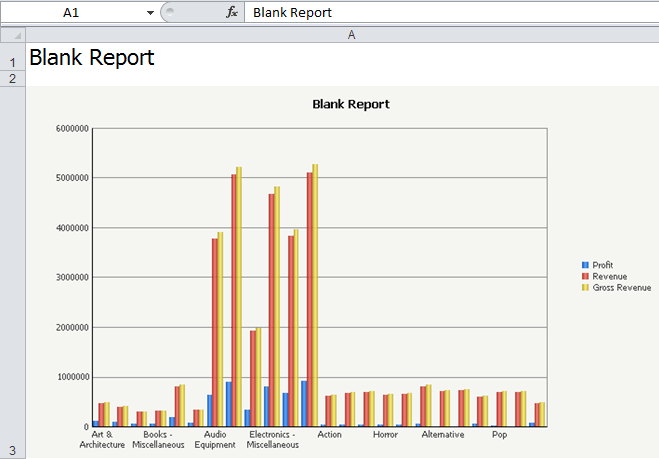
However, after exported to Excel, the graph displays all Subcategory elements and all 3 metrics, like shown below. 
 

ka04W000000OgIQQA0_0EM4400000026Sv.png

 
STEPS RO REPRODUCE:

  1. In Strategy Tutorial, create a report with the Subcategory attribute and the Profit, Revenue, and Gross Revenue metrics.f
  2. Execute the report and view it in graph or grid/graph mode.All 3 metrics and the first 6 elements of Subcategory are displayed on the graph.
  3. Under Graph options, set the maximum number of series to 2 and save the report.
  4. Export the graph to Excel with formatting.
  5. Select the option "embed images".
  6. Notice that the hidden series still appear on the graph and legend as well as all the attribute elements.

CAUSE:
This is a known issue in Strategy Web 9.4.1 and above.
 
ACTION:
Strategy will continue to investigate and post updates as soon as they are available.


Comment

0 comments

Details

Knowledge Article

Published:

June 15, 2017

Last Updated:

June 15, 2017