EducationSoftwareStrategy.com
StrategyCommunity

Knowledge Base

Product

Community

Knowledge Base

TopicsBrowse ArticlesDeveloper Zone

Product

Download SoftwareProduct DocumentationSecurity Hub

Education

Tutorial VideosSolution GalleryEducation courses

Community

GuidelinesGrandmastersEvents
x_social-icon_white.svglinkedin_social-icon_white.svg
Strategy logoCommunity

© Strategy Inc. All Rights Reserved.

LegalTerms of UsePrivacy Policy
  1. Home
  2. Topics

KB45291: "QueryTask Error:Error:undefined " error appears when displaying an ESRI Map configured to display a large number areas in Express Mode for the ASP version of MicroStrategy Web 9.4.0.


Community Admin

• Strategy


An error will show up when displaying a large number of areas in an ESRI Map in Express Mode for MicroStrategy Web 9.4.0 ASP version

SYMPTOM:
 
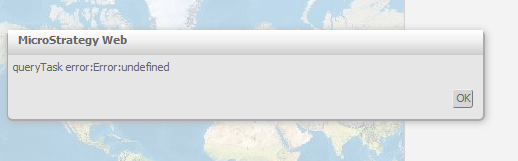
An error will show up when displaying a large number of areas in an ESRI Map in Express Mode for Strategy Web 9.4.0 ASP version, as shown below:
 

ka04W000000ObtIQAS_0EM4400000026SV.png


queryTask error:Error:undefined

  
In the image above the ESRI Map was configured to retrieve the 159 areas of the counties in the state of Georgia.
 
CAUSE:
 
The ESRI Map widget will query up to 2000 characters using a GET request to the ESRI Server. Once this limit is reached, the ESRI widget will use a POST request to the ESRI proxy defined in the proxy.ashx or proxy.jsp file. In Strategy Web 9.4.0 ASP this file is not referenced correctly in Express Mode. A Fiddler trace will reveal that the actual file in the POST request is the JSP version of the file as shown below:

ka04W000000ObtIQAS_0EM4400000026SU.png

 
In the image above the user is running the ESRI plug-in in an ASPx environment, however the file request goes out for the 'jsp' folder.
This incorrect file request is a known issue with the ESRI plug in in Strategy Web 9.4.0.
 
ACTION:
 
Contact Strategy Technical Support for an update on this issue.
  
WORKAROUND:
 
If possible, use Interactive or Flash mode instead of Express Mode.
 
The internal Strategy reference number for the issue discussed in this technical note is 816846.
KB45291


Comment

0 comments

Details

Knowledge Article

Published:

June 13, 2017

Last Updated:

November 12, 2018