EducationSoftwareStrategy.com
StrategyCommunity

Knowledge Base

Product

Community

Knowledge Base

TopicsBrowse ArticlesDeveloper Zone

Product

Download SoftwareProduct DocumentationSecurity Hub

Education

Tutorial VideosSolution GalleryEducation courses

Community

GuidelinesGrandmastersEvents
x_social-icon_white.svglinkedin_social-icon_white.svg
Strategy logoCommunity

© Strategy Inc. All Rights Reserved.

LegalTerms of UsePrivacy Policy
  1. Home
  2. Topics

KB45292: An extra white space is rendered between the document container and the browser window in Interactive or Editable Modes for MicroStrategy Web while using Chrome


Community Admin

• Strategy


This KB article discusses a known issue with rendering documents in Interactive or Editable Modes in the Google Chrome browser using MicroStrategy Web. A fix is still under investigation, but a workaround is available.

SYMPTOM:
An extra white space is rendered between the document container and the browser window when executing any document in Interactive or Editable Modes in Strategy Web  9.4.x-10.x while using Google Chrome, as shown below:
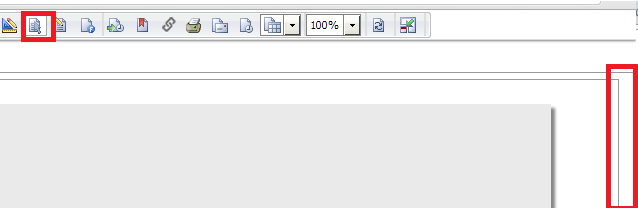
ka04W000000Og12QAC_0EM4400000026SX.png

 
CAUSE:
This is a known issue with rendering documents in Interactive or Editable Modes in the Google Chrome browser using Strategy Web  9.4.x-10.x.
 
ACTION:
Strategy will continue to investigate and post updates as soon as they are available.
 
WORKAROUND:
Consider using Express or Flash modes instead. If Interactive and Editable have to be used, follow these steps:
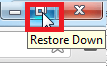
  •  Restore the browser window as shown below:
ka04W000000Og12QAC_0EM4400000026SY.png
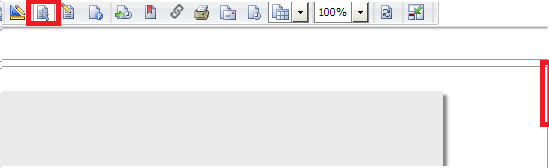
  • Maximize the browser window again and the document will show correctly:
ka04W000000Og12QAC_0EM4400000026SI.png


Comment

0 comments

Details

Knowledge Article

Published:

July 17, 2017

Last Updated:

July 17, 2017