EducationSoftwareStrategy.com
StrategyCommunity

Knowledge Base

Product

Community

Knowledge Base

TopicsBrowse ArticlesDeveloper Zone

Product

Download SoftwareProduct DocumentationSecurity Hub

Education

Tutorial VideosSolution GalleryEducation courses

Community

GuidelinesGrandmastersEvents
x_social-icon_white.svglinkedin_social-icon_white.svg
Strategy logoCommunity

© Strategy Inc. All Rights Reserved.

LegalTerms of UsePrivacy Policy
  1. Home
  2. Topics

KB45300: When using a customized graph Auto-Style will the "Curved Lines" options be carried over to a new graph in MicroStrategy 9.x?


Community Admin

• Strategy


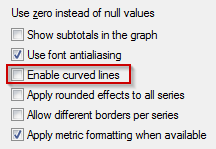
Currently when creating a new graph Auto-Style with the "Curved Lines" option enabled and then applying the newly created Auto-Style to a new graph, the "Curved Lines" option won't be carried over to the new graph.
 
QUESTION: 
Is it possible to create an Auto-Style with "Curved Lines" option enabled?
Currently when creating a new graph Auto-Style with the "Curved Lines" option enabled and then applying the newly created Auto-Style to a new graph, the "Curved Lines" option won't be carried over to the new graph.
 

ka04W000000OdvPQAS_0EM4400000026Ql.png

 
ANSWER:
This is working by design, any setting from the "Graph Options" menu won't be carried over using Auto-Styles. 


Comment

0 comments

Details

Knowledge Article

Published:

June 15, 2017

Last Updated:

June 15, 2017