EducationSoftwareStrategy.com
StrategyCommunity

Knowledge Base

Product

Community

Knowledge Base

TopicsBrowse ArticlesDeveloper Zone

Product

Download SoftwareProduct DocumentationSecurity Hub

Education

Tutorial VideosSolution GalleryEducation courses

Community

GuidelinesGrandmastersEvents
x_social-icon_white.svglinkedin_social-icon_white.svg
Strategy logoCommunity

© Strategy Inc. All Rights Reserved.

LegalTerms of UsePrivacy Policy
  1. Home
  2. Topics

KB45302: Custom formatting does not appear on axes values on a graph in Flash mode if Axes Number formatting is set to "From Grid" in MicroStrategy Web 9.4.1.


Community Admin

• Strategy


Custom formatting does not appear on axes values on a graph in Flash mode if Axes Number formatting is set to "From Grid" in MicroStrategy Web 9.4.1.

SYMPTOM:
Custom formatting does not appear on axes values on a graph in Flash mode if Axes Number formatting is set to "From Grid" in Strategy Web 9.4.1.
 
STEPS TO REPRODUCE:
In Strategy Web,

  • Create a report with at least one metric.
  • Create a document from the report.
  • In Editable mode, right click on the grid and click Format.
  • Change the Number formatting of the metric values to be Custom (Ex. #,###,##0,,.0"M")
ka04W000000ObPwQAK_0EM4400000026Qv.png
  • Switch the grid to a graph. Notice the values on the y-axis show the formatting.
ka04W000000ObPwQAK_0EM4400000026Qt.png
  • Right click on the graph and select Format.
  • Under Number tab, select "All Axes" as the target and select "From Grid"
ka04W000000ObPwQAK_0EM4400000026Qp.png
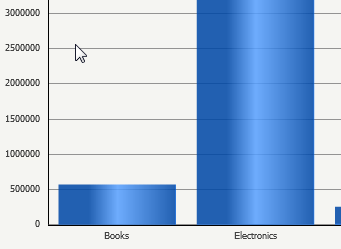
  • Run document in Flash mode. Notice the formatting does not appear.
ka04W000000ObPwQAK_0EM4400000026Qr.png

 
CAUSE:
This is a known issue for Strategy Web 9.4.1.
 
ACTION:
This issue does not occur in Presentation Mode, which is the default mode that Strategy Web 10.x runs the documents in. As seen in KB257502: New in MicroStrategy 10.1 - Interactive and Flash document view modes deprecated it is recommended to use this mode to run all documents moving forward.
WORKAROUND:
Use "Default" as the Number formatting for axes on the graph or run the document in a different mode than Flash.


Comment

0 comments

Details

Knowledge Article

Published:

June 2, 2017

Last Updated:

June 2, 2017