EducationSoftwareStrategy.com
StrategyCommunity

Knowledge Base

Product

Community

Knowledge Base

TopicsBrowse ArticlesDeveloper Zone

Product

Download SoftwareProduct DocumentationSecurity Hub

Education

Tutorial VideosSolution GalleryEducation courses

Community

GuidelinesGrandmastersEvents
x_social-icon_white.svglinkedin_social-icon_white.svg
Strategy logoCommunity

© Strategy Inc. All Rights Reserved.

LegalTerms of UsePrivacy Policy
  1. Home
  2. Topics

KB45325: How to change highlight color for a grid elements when used as selectors for Report Services document DHTML mode in MicroStrategy Web 9.x


Community Admin

• Strategy


How to change highlight color for a grid elements when used as selectors for Report Services document DHTML mode in MicroStrategy Web 9.x

SYMPTOM:
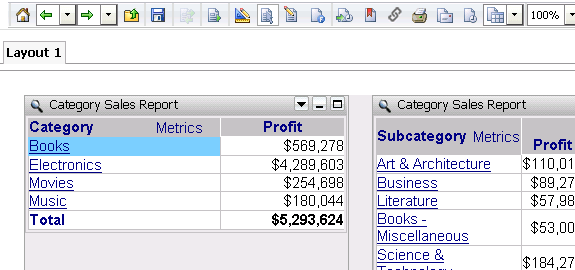
TN 34887 provides steps for how to change highlight color for a grid elements when used as selectors in Strategy Web and Mobile. However the setting only takes effect for Express mode and Flash mode in Strategy Web but not in Report Services document DHTML as shown below:
ka04W000001MKr6QAG_0EM4400000026Sd.png

 
CAUSE:
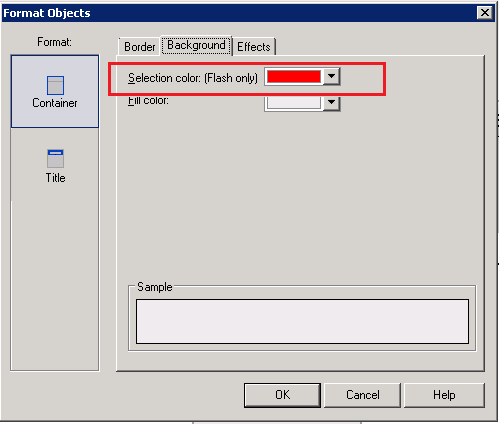
This is by design as specified in Desktop>Format>Format>Background>Selection Color, which applies to Flash Only:
ka04W000001MKr6QAG_0EM4400000026Sf.png

 
WORKAROUND:
Modify or replace "gridHiliteSelected.gif" to an image with desired color.
For .Net environment, the image can be found in the below path:

ka04W000001MKr6QAG_0EM4400000026Sy.png

For J2EE environment, it can be found in the corresponding folder under webapps/MicroStrategy/.
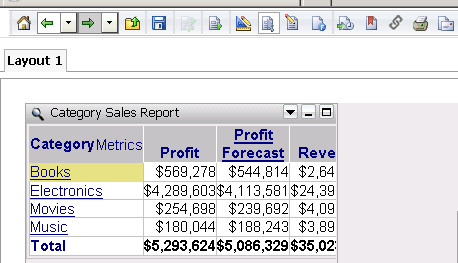
Below is an example when the image is changed to a yellow gif image:
ka04W000001MKr6QAG_0EM4400000026Sw.png


Comment

0 comments

Details

Knowledge Article

Published:

April 5, 2017

Last Updated:

April 5, 2017