EducationSoftwareStrategy.com
StrategyCommunity

Knowledge Base

Product

Community

Knowledge Base

TopicsBrowse ArticlesDeveloper Zone

Product

Download SoftwareProduct DocumentationSecurity Hub

Education

Tutorial VideosSolution GalleryEducation courses

Community

GuidelinesGrandmastersEvents
x_social-icon_white.svglinkedin_social-icon_white.svg
Strategy logoCommunity

© Strategy Inc. All Rights Reserved.

LegalTerms of UsePrivacy Policy
  1. Home
  2. Topics

KB45342: Smart metric evaluation order changes after re-adding to grid in MicroStrategy Developer


Stefan Zepeda

Salesforce Solutions Architect • Strategy


STEPS TO REPRODUCE:
Follow the steps below to reproduce the issue in Tutorial project:
  • Create two same Compound Metrics ‘CM1’ and 'CM2' (e.g. metric [Cost] / [Revenue]) with ‘Allow Smart Metric’ enabled.
  • Create a report with Category in Row, and metrics CM1 and CM2 in column. Enable Total from Menu -> Data -> Subtotals.
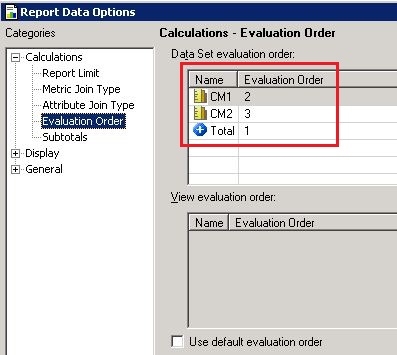
  • Go to Menu -> Data -> Report Data Options -> Calculations -> Evaluation Order, and set evaluation order (EO) as shown below:
ka02R000000kVrhQAE_0EM440000002CaM.jpeg
  • 
     - EO(Total) = 1
     - EO(CM1) = 2
     - EO(CM2) = 3
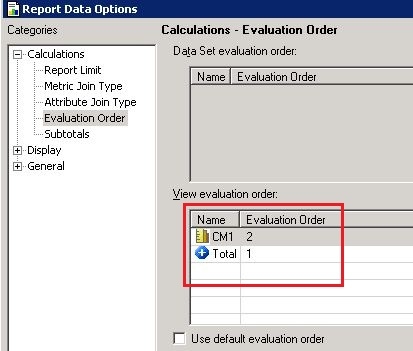


  • Remove CM2 from grid in report design view, and find that the evaluation order becomes 'View evaluation order' instead of 'Data Set evaluation order', as shown below:
ka02R000000kVrhQAE_0EM440000002CaO.jpeg
  • 
     - EO(Total) = 1
     - EO(CM1) = 2


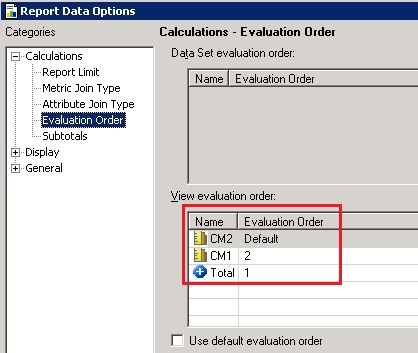
  • Add CM2 back to grid again, and find that the evaluation order of CM2 changes into Default, as shown below:
ka02R000000kVrhQAE_0EM440000002CaL.jpeg
  • 
     - EO(CM2) = Default
     - EO(Total) = 1
     - EO(CM1) = 2


CAUSE:
This behavior is by design. When the metric CM2 is removed from grid, the report becomes a private base + private subset structure. Therefore, the evaluation order becomes:
For Base:


- EO(CM2) = Default

For Subset:

 - EO(Total) = 1
 - EO(CM1) = 2.

After that, when the metric CM2 is added back to grid again, the evaluation order becomes:
For Subset:

 - EO(CM2) = Default
 - EO(Total) = 1
 - EO(CM1) = 2

NOTE: the calculation order is different from the original one because Default is -1.
  
WORKAROUND:
Modify the evaluation order manually after re-adding metric to grid in Strategy Developer.


Comment

0 comments

Details

Knowledge Article

Published:

May 19, 2017

Last Updated:

May 19, 2017