EducationSoftwareStrategy.com
StrategyCommunity

Knowledge Base

Product

Community

Knowledge Base

TopicsBrowse ArticlesDeveloper Zone

Product

Download SoftwareProduct DocumentationSecurity Hub

Education

Tutorial VideosSolution GalleryEducation courses

Community

GuidelinesGrandmastersEvents
x_social-icon_white.svglinkedin_social-icon_white.svg
Strategy logoCommunity

© Strategy Inc. All Rights Reserved.

LegalTerms of UsePrivacy Policy
  1. Home
  2. Topics

KB45346: Conditional formatting on Selected Text Field does not work in MicroStrategy Developer and Web 9.x and 10.x


Stefan Zepeda

Salesforce Solutions Architect • Strategy


This article discusses and issue with applying thresholds on dynamic text fields and how to appropriately do this instead in both Developer and Web in MicroStrategy 9.x and 10.x.

SYMPTOM:
 
When users define Conditional Formatting on dynamic text such as {attribute@DESC} and choose 'Selected Text Field' as the field to be formatted, then the formatting is not applied to the text. This happens in both Developer and Web in Strategy 9.x and 10.x.
 
STEPS TO REPRODUCE:
Following steps are performed in Tutorial project in Developer.
  • Create a report with Category and Profit.
  • Create a document based from the report.
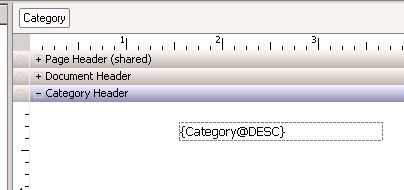
  • In the document, place Category to the group by field.
  • In Category Header section, insert dynamic text and define expression as {Category@DESC}.
     
ka02R000000kcXyQAI_0EM440000002CaU.jpeg
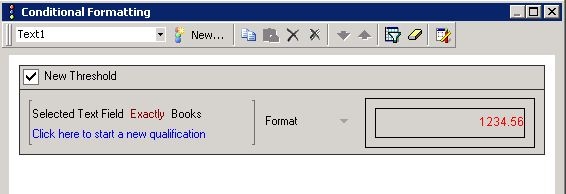
  • Right mouse click the text and choose Conditional Formatting. Define threshold as:
    - Selected Text Field Exactly Books. 
    - Format to font in red.
     
ka02R000000kcXyQAI_0EM440000002CaP.jpeg
  • Run document. Choose Books in the page-by selector. Notice that the conditional formatting is not applied.
     
ka02R000000kcXyQAI_0EM440000002CaS.jpeg


CAUSE:
This is a known limitation of applying thresholds onto dynamic text in Strategy 9.x. and 10.x.
 
ACTION:
Define the threshold on the Category attribute instead of 'Selected Text Field', with condition Category In list {Books}. Then the formatting will be applied correctly.


Comment

0 comments

Details

Knowledge Article

Published:

April 13, 2017

Last Updated:

April 13, 2017