EducationSoftwareStrategy.com
StrategyCommunity

Knowledge Base

Product

Community

Knowledge Base

TopicsBrowse ArticlesDeveloper Zone

Product

Download SoftwareProduct DocumentationSecurity Hub

Education

Tutorial VideosSolution GalleryEducation courses

Community

GuidelinesGrandmastersEvents
x_social-icon_white.svglinkedin_social-icon_white.svg
Strategy logoCommunity

© Strategy Inc. All Rights Reserved.

LegalTerms of UsePrivacy Policy
  1. Home
  2. Topics

KB45350: Freeform SQL report cannot correctly sort on Chinese character in MicroStrategy Developer and Web 9.x


Stefan Zepeda

Salesforce Solutions Architect • Strategy


Freeform SQL report cannot correctly sort on Chinese character in MicroStrategy Developer and Web 9.x

SYMPTOM:
 
Freeform SQL report cannot correctly sort on Chinese character in Strategy Developer and Web 9.x as shown below:
 

ka02R000000kYYbQAM_0EM440000002Ca9.png

 
The desired report which sorts on DESC form of attribute Category3 in ascending order is as shown below:
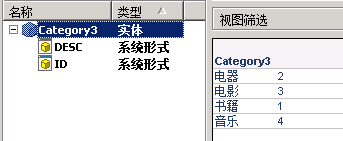
 

ka02R000000kYYbQAM_0EM440000002CaN.png

 
CAUSE:
 
One possible cause for this issue is that the column the sorting order is based on are mapping to attribute form of managed object. In such kind of scenario, "Support multiple languages" option for this form is grayed out as shown below:
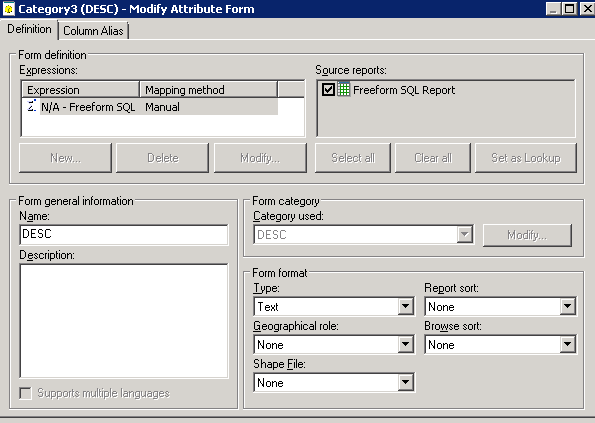


ka02R000000kYYbQAM_0EM440000002CaC.png

 
ACTION:


  1. Create a new project attribute with  "Support multiple languages" option checked in the DESC form by following tech note below:

KB44891: Report grid cannot correctly sort on Chinese characters in pinyin order in MicroStrategy Desktop 9.x  


  • Modify Freeform SQL definition and map columns to this project attribute instead of managed object attribute.

Comment

0 comments

Details

Knowledge Article

Published:

June 7, 2017

Last Updated:

June 7, 2017