EducationSoftwareStrategy.com
StrategyCommunity

Knowledge Base

Product

Community

Knowledge Base

TopicsBrowse ArticlesDeveloper Zone

Product

Download SoftwareProduct DocumentationSecurity Hub

Education

Tutorial VideosSolution GalleryEducation courses

Community

GuidelinesGrandmastersEvents
x_social-icon_white.svglinkedin_social-icon_white.svg
Strategy logoCommunity

© Strategy Inc. All Rights Reserved.

LegalTerms of UsePrivacy Policy
  1. Home
  2. Topics

KB45352: "There are two items with the same name in collection Folder" error appears when creating metrics in Command manager 9.4.x-10.x


Community Admin

• Strategy


This knowledge base article documents why "There are two items with the same name in collection Folder" error appears when creating metrics in Command manager 9.4.x-10.x.

SYMPTOM:
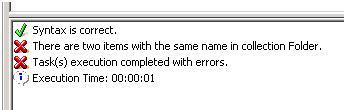
"There are two items with the same name in collection Folder" error appears when creating metrics in Command manager 9.4.x-10.x as shown below:
ka04W000000OgjCQAS_0EM4400000029V2.png


Syntax is correct.

There are two items with the same name in collection Folder.

Task(s) execution completed with errors.
 
STEPS TO REPRODUCE:
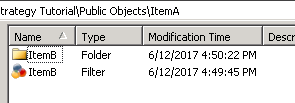
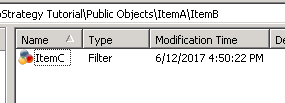
1. Run script below to create folder ItemA, ItemB and filter ItemB and ItemC. Folder ItemB and filter ItemB both are under folder ItemA. Filter ItemC is under folder ItemB.
CREATE FOLDER "ItemA" IN "\Public Objects" HIDDEN FALSE FOR PROJECT "Strategy Tutorial";
CREATE FOLDER "ItemB" IN "\Public Objects\ItemA" HIDDEN FALSE FOR PROJECT "Strategy Tutorial";
CREATE FILTER "ItemB" IN FOLDER "\Public Objects\ItemA" EXPRESSION "Region@ID=1" ON PROJECT "Strategy Tutorial";
CREATE FILTER "ItemC" IN FOLDER "\Public Objects\ItemA\ItemB" EXPRESSION "Region@ID=1" ON PROJECT "Strategy Tutorial";

ka04W000000OgjCQAS_0EM440000002PaF.png
ka04W000000OgjCQAS_0EM440000002PZg.png

2. Run the script below to create a metric with error as shown below:
CREATE METRIC "New Metric2" IN FOLDER "\Public Objects\ItemA\ItemB" EXPRESSION "Count(Customer){~}<>" FOR PROJECT "Strategy Tutorial";
 

ka04W000000OgjCQAS_0EM4400000029V2.png


Syntax is correct.

There are two items with the same name in collection Folder.

Task(s) execution completed with errors.


CAUSE:
Command Manager failed to create metrics when there are two items with the same name in the parent folder, even though they have different object types (filters vs folders). This is a known issue in Command Manager 9.2.1m.
 
ACTION:
Contact Strategy Technical Support for the latest update on this issue.
 
WORKAROUND:
There are two workarounds as shown below:

  1. Manually change the name of filter ItemB.
  2. Change the filter information in the script when creating metrics from <\public objects\ItemA\ItemB\ItemC> to <;@2;->. But, this expression will not work if there are two filters with same name while existing in different paths, since it will search for filter globally.

Comment

0 comments

Details

Knowledge Article

Published:

June 12, 2017

Last Updated:

June 12, 2017